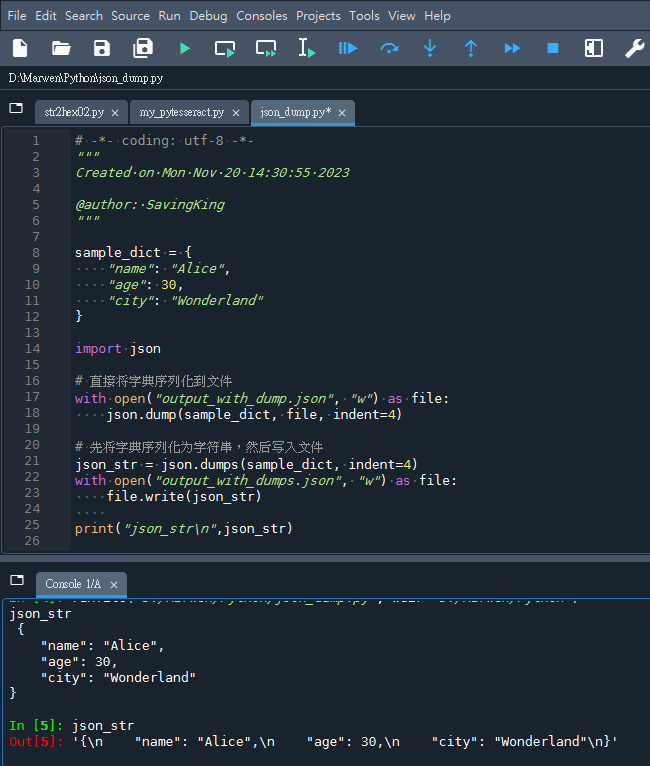
code:
# -*- coding: utf-8 -*-
"""
Created on Mon Nov 20 14:30:55 2023
@author: SavingKing
"""
sample_dict = {
"name": "Alice",
"age": 30,
"city": "Wonderland"
}
import json
# 直接将字典序列化到文件
with open("output_with_dump.json", "w") as file:
json.dump(sample_dict, file, indent=4)
# 先将字典序列化为字符串,然后写入文件
json_str = json.dumps(sample_dict, indent=4)
with open("output_with_dumps.json", "w") as file:
file.write(json_str)code & 輸出結果:

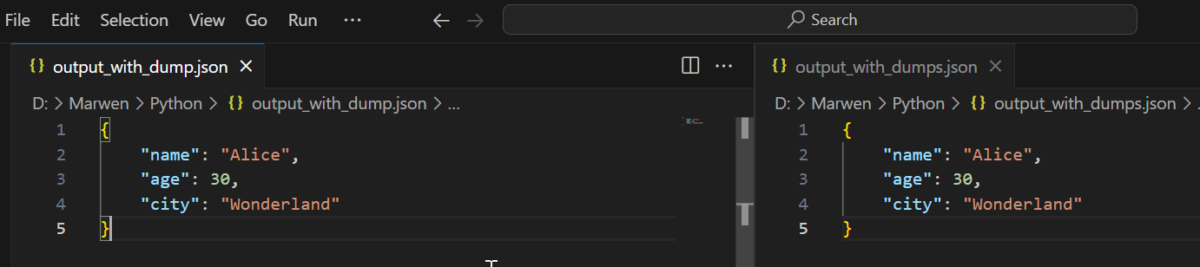
两个文件 output_with_dump.json 和 output_with_dumps.json 将包含相同的JSON内容,但是生成这些文件的过程不同。json.dump() 是一步到位的方法,直接将对象写入文件;而json.dumps() 则是一个两步的过程,先创建字符串,然后将其写入文件。在结果上,两者是等效的:
推薦hahow線上學習python: https://igrape.net/30afN
![Python 讀取 DOCX 圖片關聯:qn+find/findall 與 XPath 的實戰對照 from lxml import etree ; from docx.oxml.ns import qn; lxml.etree._Element.findall( f”.//{ qn(‘a:blip’) }” ) ; .get( qn(“r:embed”) ) #獲取 屬性名 ‘r:embed’ 的 屬性值(如: ‘rId4’) ; lxml.etree._Element.xpath( “//a:blip/@r:embed”, namespaces = NS) #/@r:embed = 獲取 屬性名 ‘r:embed’ 的 屬性值(如: ‘rId4’),使用.findall() 要先.findall()獲取List[_Element],再迴圈_Element.get()獲取屬性值, .xpath() 第一個參數path 使用”//a:blip/@r:embed” ,可直接獲取屬性值(List[str]如: [‘rId4’, ‘rId5’]) ; 如何對docx真實移除圖片瘦身? Python 讀取 DOCX 圖片關聯:qn+find/findall 與 XPath 的實戰對照 from lxml import etree ; from docx.oxml.ns import qn; lxml.etree._Element.findall( f”.//{ qn(‘a:blip’) }” ) ; .get( qn(“r:embed”) ) #獲取 屬性名 ‘r:embed’ 的 屬性值(如: ‘rId4’) ; lxml.etree._Element.xpath( “//a:blip/@r:embed”, namespaces = NS) #/@r:embed = 獲取 屬性名 ‘r:embed’ 的 屬性值(如: ‘rId4’),使用.findall() 要先.findall()獲取List[_Element],再迴圈_Element.get()獲取屬性值, .xpath() 第一個參數path 使用”//a:blip/@r:embed” ,可直接獲取屬性值(List[str]如: [‘rId4’, ‘rId5’]) ; 如何對docx真實移除圖片瘦身?](https://i1.wp.com/savingking.com.tw/wp-content/uploads/2025/11/20251119130848_0_3fbf6b.png?quality=90&zoom=2&ssl=1&resize=350%2C233)
![Python Pandas GroupBy 的 size 陷阱:為什麼你的計數結果總是不對?如何計算重複次數? duplicates = df.duplicated( subset = [‘name’] ) Python Pandas GroupBy 的 size 陷阱:為什麼你的計數結果總是不對?如何計算重複次數? duplicates = df.duplicated( subset = [‘name’] )](https://i2.wp.com/savingking.com.tw/wp-content/uploads/2025/06/20250609143758_0_53821c.png?quality=90&zoom=2&ssl=1&resize=350%2C233)


![Python Logging 完全指南:從基礎到實戰應用; import logging ; logging.basicConfig(level=logging.INFO, handlers=[ logging.StreamHandler(), logging.FileHandler(‘app.log’, mode=’a’, encoding=’utf-8′)] ) ; inspect.currentframe().f_code.co_name #動態取得funcName Python Logging 完全指南:從基礎到實戰應用; import logging ; logging.basicConfig(level=logging.INFO, handlers=[ logging.StreamHandler(), logging.FileHandler(‘app.log’, mode=’a’, encoding=’utf-8′)] ) ; inspect.currentframe().f_code.co_name #動態取得funcName](https://i1.wp.com/savingking.com.tw/wp-content/uploads/2025/10/20251021155823_0_c16012.png?quality=90&zoom=2&ssl=1&resize=350%2C233)


近期留言