


## 1. 這篇在解決什麼問題?
在 `my_pdf2text_08.py` 裡,有這段程式:
for row_index, row_values in enumerate(table_df.itertuples(index=False, name=None), start=1):
    row_record: Dict[str, Any] = {
        "page": page_number,
        "table_no": table_no,
        "table_key": table_key,
        "source_row_no": row_index,
    }
    for col_index, value in enumerate(row_values):
row_record[f"col_{col_index}"] = value這篇主要說明:
為什麼這裡用 itertuples(),不是 iterrows()。
index=False 是什麼意思。
name=None 是什麼意思。
## 2. 先建立一個簡單 DataFrame
在 Jupyter / Interactive Window 裡先執行:
import pandas as pd
df = pd.DataFrame(
[
["R1", "10k"],
["C1", "0.1uF"],
],
columns=["part_no", "value"],
)
df這張表長這樣:
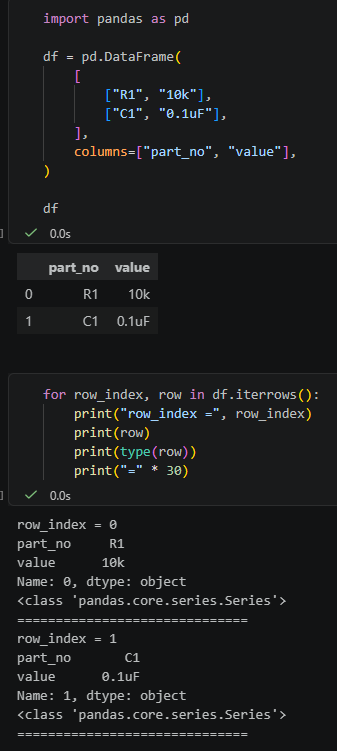
左邊的 `0`、`1` 是 DataFrame 的 index。
上面的 `part_no`、`value` 是 DataFrame 的 column 名稱,
這比較接近一般從 Excel 讀進來的表格。
## 3. iterrows():回傳 index 和 Series
執行:
for row_index, row in df.iterrows():
print("row_index =", row_index)
print(row)
print(type(row))
print("=" * 30)輸出概念是:
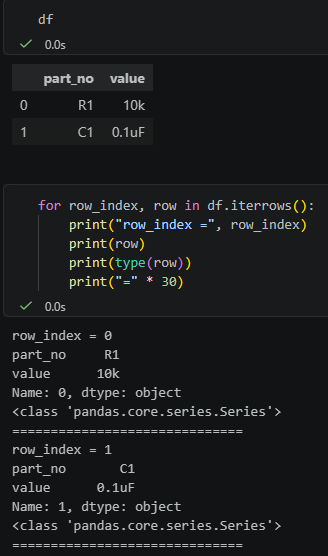
所以 `iterrows()` 每次回傳的是:
(index, Series)
也就是:
row_index # 原本 DataFrame 的 row index,例如 0、1
row # 這一列資料,型別是 Series;
# row.index 是 column 名稱,例如 part_no、value這裡要分清楚兩種 index:
row_index
來自 df.iterrows() 回傳的第一個值,
代表原本 DataFrame 的 row index。
row.index
是 row 這個 Series 自己的 index,
內容是 DataFrame 的 column 名稱。
如果只是要照順序搬每個 cell,
`Series` 會比較重,
而且原本的 index (`row_index`)
不一定是我們想輸出的 row 編號(`source_row_no`)。
## 4. itertuples() 預設:回傳 namedtuple,包含 index
執行:
for row in df.itertuples():
print(row)
print(type(row))
print("=" * 30)輸出概念是:
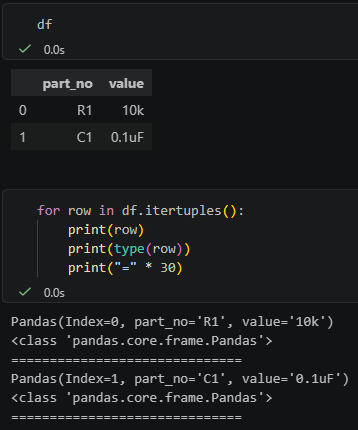
`itertuples()` 的預設參數是:
index=True
name="Pandas"所以它會:
把 DataFrame index 放進 tuple 的第一個欄位。
回傳 namedtuple,型別名稱叫 Pandas。
## 5. index=False:不要 DataFrame 原本的 index
執行:
for row in df.itertuples(index=False):
print(row)
print("=" * 30)輸出概念是:
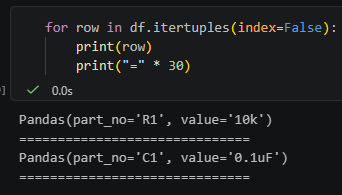
這裡的:
index=False
意思是:
不要把 DataFrame 原本的 index 放進每一列資料。
所以不會出現:
Index=0
Index=1
但這時候回傳的仍然是 namedtuple,名字還是 `Pandas`。
## 6. name=None:不要 namedtuple,回傳普通 tuple
執行:
for row in df.itertuples(index=False, name=None):
print(row)
print(type(row))
print("=" * 30)輸出概念是:
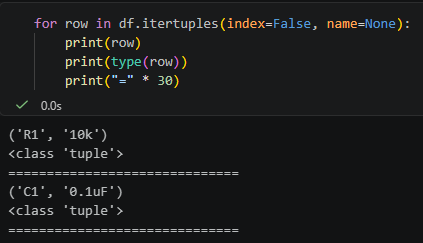
這裡的:
name=None
意思是:
不要建立 namedtuple。
直接回傳普通 tuple。
所以:
df.itertuples(index=False, name=None)得到的每一列就是最單純的:
('R1', '10k')
('C1', '0.1uF')
## 7. 為什麼 index 用 False,name 用 None?
因為兩個參數問的問題不同。
`index` 是開關:
要不要包含 DataFrame index?
所以用布林值
`name` 是名稱設定:
namedtuple 的型別名稱要叫什麼?
所以可以用字串:
name=”Pandas”
name=”Row”
也可以用 `None` 表示不要 namedtuple:
name=None
整理成一句話:
index=False 是不要 index。
name=None 是不要 namedtuple,直接用普通 tuple。
## 8. Pandas 和 Row 有什麼差別?
執行:
for row in df.itertuples(index=False):
print(row)
print("=" * 30)
for row in df.itertuples(index=False, name="Row"):
print(row)
print("=" * 30)輸出概念是:
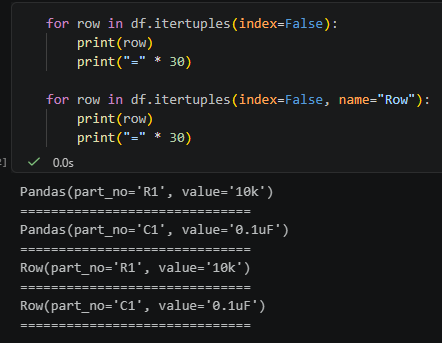
差別只是 namedtuple 的型別名稱:
name=”Pandas” -> Pandas(…)
name=”Row” -> Row(…)
name=None -> 普通 tuple (…)
在 `my_pdf2text_08.py` 裡,
我們只是要依序讀每一列 row,
再把該 row 裡的每個 cell 依序
寫成 col_0、col_1、col_2。
不需要 `row.part_no` 或 `row.value` 這種屬性取值,
所以用 `name=None` 比較乾淨。
## 9. 對應到 my_pdf2text_08.py
目前程式是:
for row_index, row_values in enumerate(table_df.itertuples(index=False, name=None), start=1):
    row_record: Dict[str, Any] = {
        "page": page_number,
        "table_no": table_no,
        "table_key": table_key,
        "source_row_no": row_index,
    }
    for col_index, value in enumerate(row_values):
row_record[f"col_{col_index}"] = value這裡分成兩層:
table_df.itertuples(index=False, name=None)
取得每一列的普通 tuple,例如 (“R1”, “10k”)。
enumerate(…, start=1)
自己產生 1, 2, 3…,當作 source_row_no。
也就是說:
不要 pandas 原本的 index。
不要 namedtuple。
只要每一列的 cell 值。
row 編號由程式自己從 1 開始產生。
## 10. 結論
`iterrows()` 適合需要 row 的 `Series` 型態,
或需要用欄名操作每列資料時使用。
`itertuples(index=False, name=None)`
適合只想快速、乾淨地逐列取得 cell 值時使用。
在這支程式裡,目標只是把表格內容搬到 Excel 的:
col_0
col_1
col_2
所以用:
table_df.itertuples(index=False, name=None)比 `iterrows()` 更直接。
推薦hahow線上學習python: https://igrape.net/30afN


![Python: 自定義函數計算計程車車資(先typing,再用預設值), 巢狀字典以及typing.Union[ ], assert 斷言](https://i1.wp.com/savingking.com.tw/wp-content/uploads/2022/09/20220923222039_57.png?quality=90&zoom=2&ssl=1&resize=350%2C233 "Python: 自定義函數計算計程車車資(先typing,再用預設值), 巢狀字典以及typing.Union[ ], assert 斷言")



近期留言