


pip install pytesseract
(安裝套件)
點此可以安裝
Tesseract installer for Windows
code:
# -*- coding: utf-8 -*-
"""
Created on Wed Sep 13 18:12:44 2023

@author: SavingKing
"""

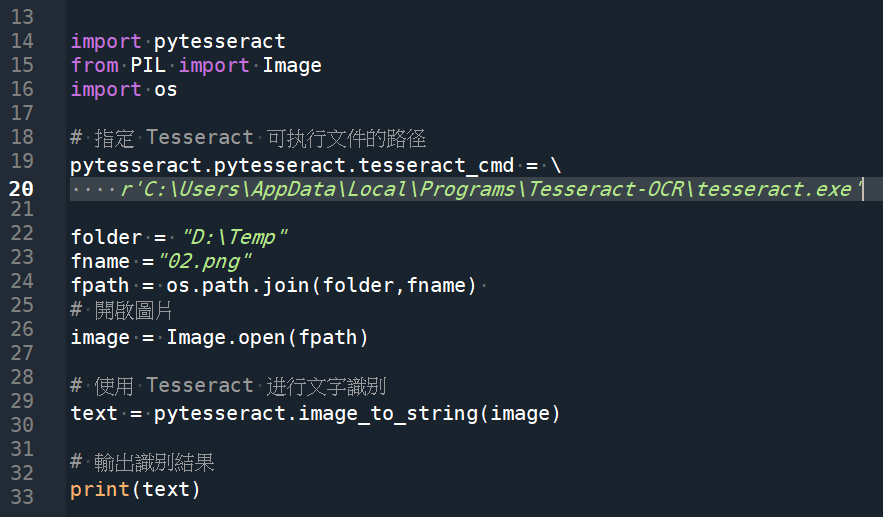
import pytesseract
from PIL import Image
import os

# 指定 Tesseract 可执行文件的路径
pytesseract.pytesseract.tesseract_cmd = \
    r'C:\Users\AppData\Local\Programs\Tesseract-OCR\tesseract.exe'
"""
pytesseract.pytesseract.tesseract_cmd 是一个变量,
用于指定 Tesseract OCR 的可执行文件(tesseract.exe)的路径。
通过设置这个变量,您可以告诉 pytesseract 库
在哪里找到 Tesseract OCR 引擎,以便进行图像文字识别。

通常情况下,您需要在代码中将
pytesseract.pytesseract.tesseract_cmd
设置为 Tesseract OCR 可执行文件的路径
"""
folder = "D:\Temp"
fname ="02.png"
fpath = os.path.join(folder,fname)
# 開啟圖片
image = Image.open(fpath)

# 使用 Tesseract 进行文字識別
text = pytesseract.image_to_string(image)

# 輸出識別結果
print(text)
code:
推薦hahow線上學習python: https://igrape.net/30afN
![Python-docx 圖片提取完全指南:從 rId 到二進位資料的探險rid ; part = doc.part.rels[rid].target_part #return part.blob if “ImagePart” in type(part).__name__ else None](https://i2.wp.com/savingking.com.tw/wp-content/uploads/2026/01/20260113135812_0_8fa645.png?quality=90&zoom=2&ssl=1&resize=350%2C233 "Python-docx 圖片提取完全指南:從 rId 到二進位資料的探險rid ; part = doc.part.rels[rid].target_part #return part.blob if “ImagePart” in type(part).__name__ else None")




近期留言