


這篇教學將帶您深入了解如何使用 Python 的 pathlib 模組來優雅地處理檔案系統路徑。
我們將重點放在 防衛式編程 (Defensive Programming) 的技巧:在嘗試操作檔案之前,先驗證其存在性與類型。
這樣做可以避免程式在執行中途崩潰 (Crash),特別是當使用者輸入錯誤路徑時。
主要使用的工具
pathlib.Path:Python 3 的現代化路徑處理物件。.exists():檢查路徑是否存在。.is_dir()/.is_file():判斷路徑類型。
from pathlib import Path
import tempfile
import os

# 為了演示方便,我們創建一個臨時的測試環境
# 包含了:一個資料夾、一個檔案、以及一個不存在的路徑
temp_dir = tempfile.TemporaryDirectory()
base_path = Path(temp_dir.name)

# 1. 建立假檔案 "test_doc.docx"
dummy_file = base_path / "test_doc.docx"
# .touch() 的功能:若檔案不存在就建立一個空檔;若存在則更新修改時間 (類似 Linux 指令)
dummy_file.touch()

# 2. 建立假資料夾 "test_folder"
dummy_dir = base_path / "test_folder"
dummy_dir.mkdir()

# 3. 建立一個根本不存在的路徑
ghost_path = base_path / "non_existent_file.txt"

print(f"測試環境已建立於: {base_path}")
print(f" - 檔案: {dummy_file}")
print(f" - 資料夾: {dummy_dir}")
print(f" - 不存在的路徑: {ghost_path}")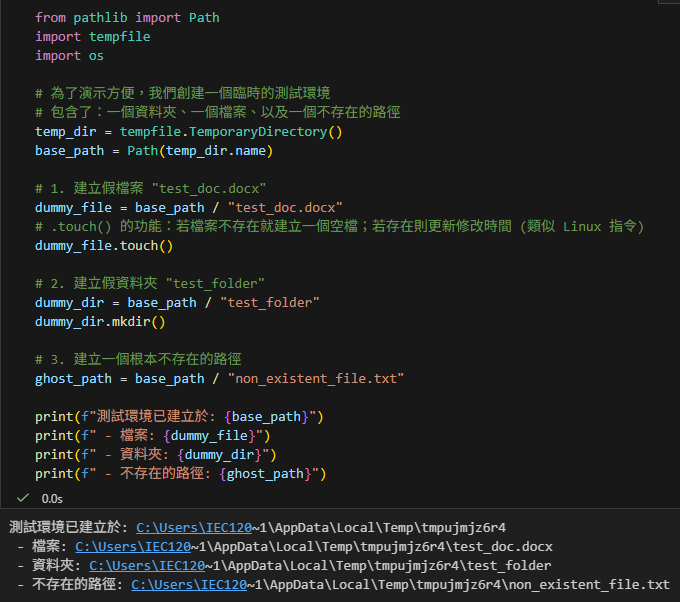
核心邏輯展示:層層把關的黃金三角
這段這段程式碼展示了最經典的「路徑檢查」邏輯。它的強大之處在於邏輯的層次分明:
- 第一關 (The Gatekeeper):先檢查
if not target_file.exists()。如果不存,直接報錯並結束。這是「Fail Fast」原則的體現。 - 第二關 (The Fork):過了第一關,代表東西一定存在。接著我們兵分兩路:
- 如果是 資料夾 (
is_dir):啟動批次處理模式。 - 如果是 檔案 (
is_file):啟動單一處理模式。
- 如果是 資料夾 (
這種寫法 (if … elif …) 非常乾淨,避免了巢狀的 if 地獄,也被稱為 Guard Clause (衛語句) 風格。
def process_docx_images(file_path):
    """這是一個模擬的處理函式,代表實際業務邏輯"""
    print(f" [模擬執行] 正在處理: {file_path.name}")

def intelligent_path_handler(target_path_str):
    """
    示範路徑檢查的核心邏輯 (Golden Path Handling)
    接受一個路徑字串,自動判斷是單一檔案還是資料夾,並做出對應處理
    """
    # 將字串轉換為 pathlib 的 Path 物件,取得操作能力
    target_file = Path(target_path_str)
    print(f"\n--- 檢查目標: {target_path_str} ---")

    # 1. 第一道防線:存在性檢查 (Gatekeeping)
    # .exists() 會檢查硬碟上是否真的有這個路徑 (無論是檔案或資料夾)
    # 如果連這關都沒過,後面做任何 is_file/is_dir 檢查都沒有意義
    if not target_file.exists():
        print(f"[Warn] 目標路徑不存在: {target_file}")
        print("Usage: 請輸入正確的 docx 檔案路徑或資料夾路徑")
        # 直接 return,此即「Fail Fast (快速失敗)」原則,避免巢狀程式碼
        return

    # 2. 第二道防線:類型分流 (由寬到窄或邏輯分支)

    # 情況 A: 如果使用者傳入的是「資料夾」(.is_dir() 為 True) -> 啟動批次處理模式
    if target_file.is_dir():
        print(f"✅ 檢測到路徑為「資料夾」,切換至資料夾批次處理模式: {target_file}")

        # .glob("*.docx") 是 pathlib 的強大功能,類似檔案總管的搜尋
        # 這裡會找出該資料夾下所有副檔名為 .docx 的檔案
        docx_list = list(target_file.glob("*.docx"))
        print(f"   -> 掃描完畢,共找到 {len(docx_list)} 個 Word 檔案。")

        for f in docx_list:
            # 實戰細節:Word開啟時會產生 ~$ 開頭的暫存檔,必須排除
            if f.name.startswith("~"):
                print(f"   (跳過暫存檔: {f.name})")
                continue
            process_docx_images(f)

    # 情況 B: 如果使用者傳入的是「標準檔案」(.is_file() 為 True) -> 啟動單一處理模式
    # 使用 elif 明確區分,避免邏輯重疊
    elif target_file.is_file():
        print("✅ 檢測到路徑為「單一檔案」,直接處理該檔案。")
        process_docx_images(target_file)

    # 情況 C: 路徑存在,但既不是檔案也不是資料夾
    # 這在 Windows 很少見,但在 Linux 可能是 Socket 或 Device file
    else:
        print("❌ 錯誤:這是一個特殊類型的路徑 (非檔案也非資料夾),系統無法處理。")

# --- 測試這一套邏輯 (模擬使用者輸入) ---

# 測試 1: 傳入一個不存在的路徑 -> 觸發第一道防線
intelligent_path_handler(str(ghost_path))

# 測試 2: 傳入一個檔案路徑 -> 進入情況 B
intelligent_path_handler(str(dummy_file))

# 測試 3: 傳入一個資料夾路徑 -> 進入情況 A
intelligent_path_handler(str(dummy_dir))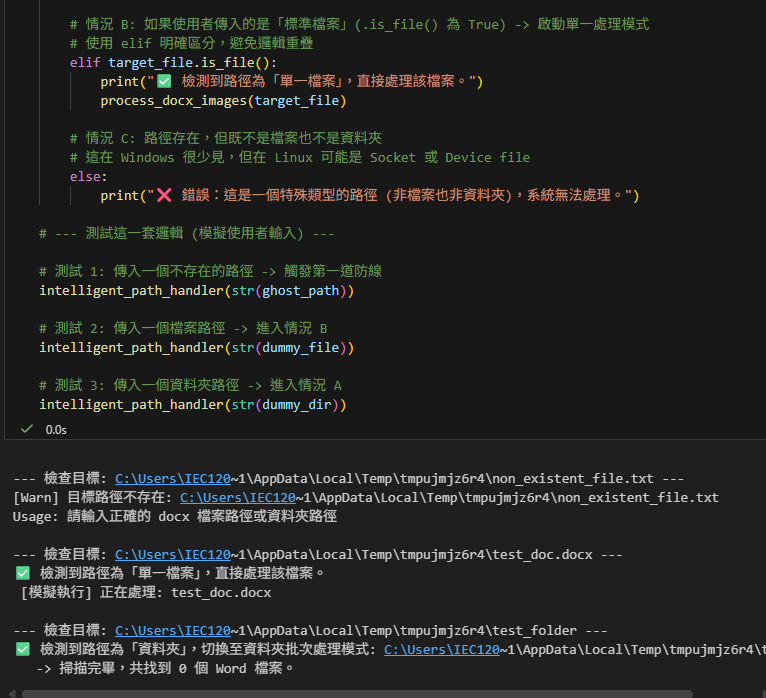
為什麼這段程式碼值得學習?
- 容錯性高:
以前使用os.path時,如果不小心把字串傳錯,可能會在更深層的程式碼才報錯 (例如open()失敗)。這段程式碼在 入口處 (Entry Point) 就攔截了錯誤。 - 多型 (Polymorphism) 的體現:
使用者不需要知道你的程式只吃檔案還是只吃資料夾。你把兩個都吃進去,內部自動判斷。這對使用者體驗 (UX) 非常好。 - 明確的
elif:
雖然邏輯上「不是資料夾通常就是檔案」,但顯式地寫出elif target_file.is_file():讓程式碼意圖更清晰,也能避免處理到不該處理的「怪東西」。
推薦hahow線上學習python: https://igrape.net/30afN


![Python四種型態增加元素 list.append(元素), tuple = tuple + (元素, ), set.add(元素), dict[key]=value](https://i2.wp.com/savingking.com.tw/wp-content/uploads/2022/05/20220513083711_22.png?quality=90&zoom=2&ssl=1&resize=350%2C233 "Python四種型態增加元素 list.append(元素), tuple = tuple + (元素, ), set.add(元素), dict[key]=value")


![Python:如何用pandas.concat() 合併兩個DataFrame並重置index? pd.concat([df1, df2]) .reset_index(drop=True) ; pd.concat([df1, df2], ignore_index=True) - 儲蓄保險王](https://savingking.com.tw/wp-content/uploads/2023/03/20230311123232_5-520x245.png)

近期留言