


為什麼需要copy?
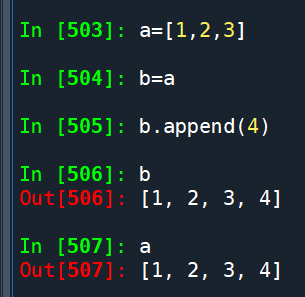
b=a ,將a賦值給b
一般人會以為已經copy了一份
實際上a, b兩變數共享同一個內存地址
b一旦變更
會影響到a也一起變更
上例 a = [1, 2, 3]
b = a.copy() #對a進行淺拷貝:
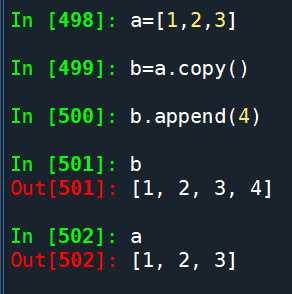
b.append(4)
對b進行了變更
a仍是原本的[1, 2, 3]
沒有影響到
a = [[1, 2, 3], {‘a’: 1, ‘b’: 2}]
a為一個list
list中的元素有list, dict
而非 整數,浮點數,字串 (不可變類型)
一樣做淺拷貝的動作:
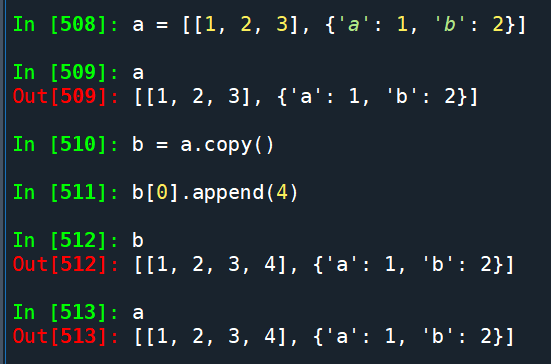
對b[0]做了變更
一併影響到a
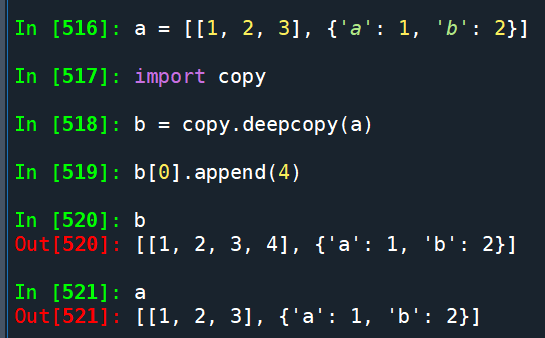
這時候就需要使用深拷貝(deep copy)
b = copy.deepcopy(a)
推薦hahow線上學習python: https://igrape.net/30afN


![Python 表達式中的魔法:用海象運算子讓斷詞程式碼更乾淨 [w_clean for w in words if (w_clean:=w.lower().strip()) and w_clean not in STOPWORDS]](https://i0.wp.com/savingking.com.tw/wp-content/uploads/2026/02/20260210083748_0_a7d9bf.png?quality=90&zoom=2&ssl=1&resize=350%2C233 "Python 表達式中的魔法:用海象運算子讓斷詞程式碼更乾淨 [w_clean for w in words if (w_clean:=w.lower().strip()) and w_clean not in STOPWORDS]")


近期留言