


在處理 DOCX (Zip) 內的 XML 時,
我們無法直接修改壓縮包裡的文字。
我們必須經歷三個階段:
解凍 (Parsing)
→ 手術 (Editing)
→ 冷凍 (Serialization)。
這就是 lxml.etree 兩大核心函式的工作。
- 實驗素材:document.xml.rels
假設我們從 Zip 裡讀取到了這段原始的 Bytes 資料:
# 模擬從 zf.read('word/_rels/document.xml.rels') 讀出來的內容
# 注意:這是 bytes (前面有 b'')
xml_bytes = b"""<?xml version="1.0" encoding="UTF-8" standalone="yes"?>
<Relationships xmlns="http://schemas.openxmlformats.org/package/2006/relationships">
  <Relationship Id="rId1" Type=".../image" Target="media/image1.png"/>
  <Relationship Id="rId2" Type=".../styles" Target="styles.xml"/>
</Relationships>"""- 解凍:etree.fromstring()
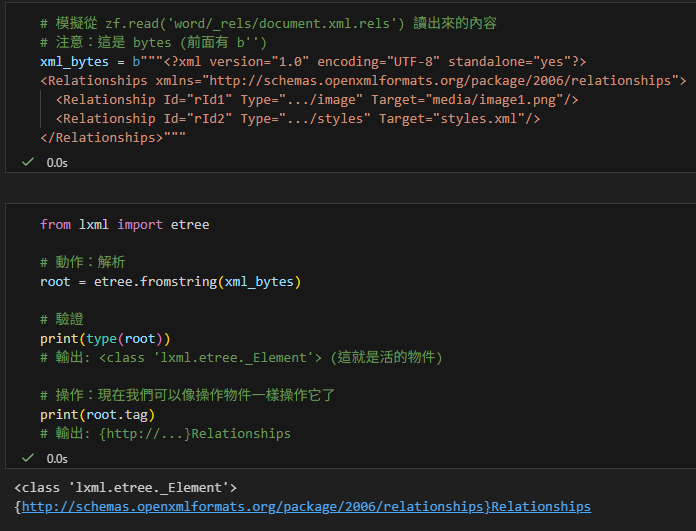
方向:Bytes → Element Object
這個函式負責將「冰冷、死的」二進位資料,
轉換成「活的、可操作的」Python 物件 (Element)
# %%
from lxml import etree

# 動作:解析
root = etree.fromstring(xml_bytes)

# 驗證
print(type(root))
# 輸出: <class 'lxml.etree._Element'> (這就是活的物件)

# 操作:現在我們可以像操作物件一樣操作它了
print(root.tag)
# 輸出: {http://...}Relationships輸出:
在 python-docx 中,所有的 CT_* 類別(如 CT_P, CT_R, CT_Body)
其實都是透過 lxml.etree 的 ElementBase 擴充而來的。

💡 關鍵觀念:為什麼要餵 Bytes?
雖然 fromstring 也能吃字串 (String),但強烈建議餵 Bytes。
因為 XML 檔頭通常包含 。
如果您傳入 String:Python 已經解碼過了,
但 XML 檔頭還說它是 UTF-8,
這有時會讓解析器混亂
(報錯:ValueError: Unicode strings with encoding declaration are not supported)。
如果您傳入 Bytes:解析器會自己看檔頭決定怎麼解碼,這是最安全的。
- 手術:修改 Element Tree
在 fromstring 和 tostring 中間,就是我們發揮邏輯的地方。
# 模擬 Step B:刪除 rId1
for rel in root.findall("{*}Relationship"):
    if rel.get("Id") == "rId1":
        root.remove(rel) # 物理刪除節點
print("已刪除 rId1")輸出:

- 冷凍:etree.tostring()
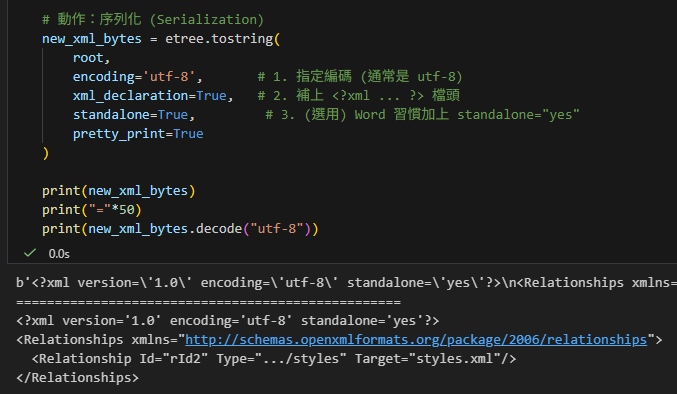
方向:Element Object → Bytes
手術完成後,這個物件還在記憶體裡,
我們必須把它變回 Bytes,才能寫回 Zip 檔案。
# %%
# 動作:序列化 (Serialization)
new_xml_bytes = etree.tostring(
    root,
    encoding='utf-8',       # 1. 指定編碼 (通常是 utf-8)
    xml_declaration=True,   # 2. 補上 <?xml ... ?> 檔頭
    standalone=True,         # 3. (選用) Word 習慣加上 standalone="yes"
    pretty_print=True
)

print(new_xml_bytes)
print("="*50)
print(new_xml_bytes.decode("utf-8"))輸出:
關鍵參數詳解
tostring 預設只會吐出 XML 的「肉」(內容),不會吐出「皮」(檔頭)。
對於 DOCX 這種嚴謹的格式,參數非常重要:
encoding=’utf-8’:
這會讓回傳值變成 Bytes。
如果不寫 (預設是 None),它可能會回傳 String,
這在寫入 Zip 時會出錯(Zip 需要 Bytes)。
xml_declaration=True:
這會加上 。
如果沒加這行,Word 打開檔案時可能會報錯說「檔案損毀」。
pretty_print=True (選用):
這會幫你縮排、換行,讓人眼好讀。
注意:在程式處理 DOCX 時,通常不建議開這個,
因為多餘的空白有時會被視為內容的一部分,
雖然在 .rels 檔沒差,但在 document.xml 裡可能會導致排版跑掉。
總結圖表

推薦hahow線上學習python: https://igrape.net/30afN
new_xml_bytes = etree.tostring()
也可以傳遞str當參數,
修改 encoding = ‘unicode’
但建議一律使用bytes
⚠️ 常見陷阱:XML Encoding 宣告衝突
為什麼當我們把一個 Python 字串 (String) 丟給 lxml 解析時,
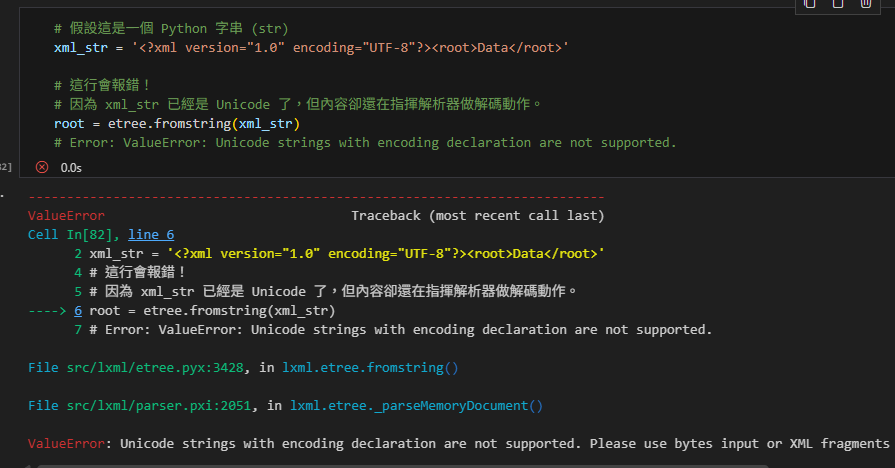
有時會噴出 ValueError: Unicode strings with encoding declaration are not supported 這樣的錯誤?
這源自於「已經解碼的字串」與「XML 檔頭宣告」之間的邏輯矛盾。
- 邏輯矛盾點
Python String (Unicode):這已經是「解碼後」的抽象文字。它在記憶體中就是文字本身,不再屬於任何特定的編碼 (如 UTF-8 或 Big5)。
XML Header ():這是一個寫給解析器看的「操作手冊」,意思是:「這串 Bytes (二進位流) 是用 UTF-8 編碼的,請照這個規則把它還原成文字」。
衝突:當您把一個 String 丟給 lxml,但內容卻包含「請用 UTF-8 解碼我」的指令,lxml 就會困惑並報錯:「你給我的明明已經是解碼好的 Unicode 文字了,為什麼還要我再去解碼?」 - 錯誤示範
# 假設這是一個 Python 字串 (str)
xml_str = '<?xml version="1.0" encoding="UTF-8"?><root>Data</root>'

# 這行會報錯!
# 因為 xml_str 已經是 Unicode 了,但內容卻還在指揮解析器做解碼動作。
root = etree.fromstring(xml_str)
# Error: ValueError: Unicode strings with encoding declaration are not supported.ValueError Traceback (most recent call last)
Cell In[82], line 6
2 xml_str = ‘Data’
4 # 這行會報錯!
5 # 因為 xml_str 已經是 Unicode 了,但內容卻還在指揮解析器做解碼動作。
—-> 6 root = etree.fromstring(xml_str)
7 # Error: ValueError: Unicode strings with encoding declaration are not supported.
File src/lxml/etree.pyx:3428, in lxml.etree.fromstring()
File src/lxml/parser.pxi:2051, in lxml.etree._parseMemoryDocument()
ValueError: Unicode strings with encoding declaration are not supported.
Please use bytes input or XML fragments without declaration.
- 正確解法 (The Fix)
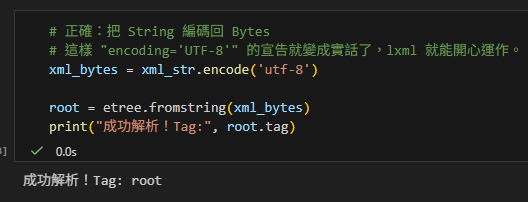
既然 XML 檔頭說它是 UTF-8 編碼的 Bytes,那我們就順著它的意,把字串 編碼 (Encode) 回 Bytes 再餵給解析器。
# 正確:把 String 編碼回 Bytes
# 這樣 "encoding='UTF-8'" 的宣告就變成實話了,lxml 就能開心運作。
xml_bytes = xml_str.encode('utf-8')

root = etree.fromstring(xml_bytes)
print("成功解析!Tag:", root.tag)輸出:
結論
處理 XML 時,盡量全程保持 Bytes (二進位) 狀態。
讀檔用 rb 模式,
爬蟲獲得的response,使用.content。
解析用 fromstring(bytes)。
這樣可以完全避開這種編碼宣告的邏輯衝突。
import requests

response = requests.get('https://example.com/data.xml')

# .content 是 bytes (原始資料) -> 適合給 lxml
xml_bytes = response.content

# .text 是 str (Requests 幫您解碼過的) -> 這是 XML_str
xml_str = response.text推薦hahow線上學習python: https://igrape.net/30afN
Element指的是lxml.etree._Element
python-docx模組中的CT_P
繼承自lxml.etree._Element:
from docx.oxml.text.paragraph import CT_P

# 列印出 CT_P 的方法解析順序 (MRO)
print("--- CT_P 的真實 MRO ---")
for i, cls in enumerate(CT_P.mro()):
    print(f"{i}. {cls}")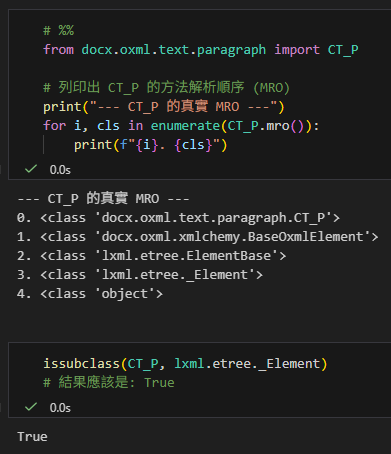
推薦hahow線上學習python: https://igrape.net/30afN


![Excel TQC考題202: 快樂小學學生名冊,自訂格式:0″公斤”;[紅色]”減”0″公斤”;[藍色]”完美身材”](https://i1.wp.com/savingking.com.tw/wp-content/uploads/2022/04/20220410142405_70.png?quality=90&zoom=2&ssl=1&resize=350%2C233 "Excel TQC考題202: 快樂小學學生名冊,自訂格式:0″公斤”;[紅色]”減”0″公斤”;[藍色]”完美身材”")


![Python: Regular Expression 正規表示法 正則表達式 import re ; pattn = "[d]{4}/[01][d]/[0123][d] [d]{6}" ; match = re .search (pattn,text) .group() - 儲蓄保險王](https://savingking.com.tw/wp-content/uploads/2022/09/20220901154435_19-520x245.png)

近期留言