


py檔位於d:\Temp資料夾底下
一開始除了py檔以外,
無其他子資料夾
code:
# -*- coding: utf-8 -*-
"""
Created on Tue Sep 26 19:21:25 2023

@author: SavingKing
"""
import os

print(os.getcwd())

os.makedirs("use makedirs") #成功
os.mkdir("use mkdir") #成功

os.makedirs("original no dir 1/use makedirs") #成功
os.mkdir("original no dir 2/use makedirs")
#FileNotFoundError: [WinError 3] 系統找不到指定的路徑。
輸出結果:
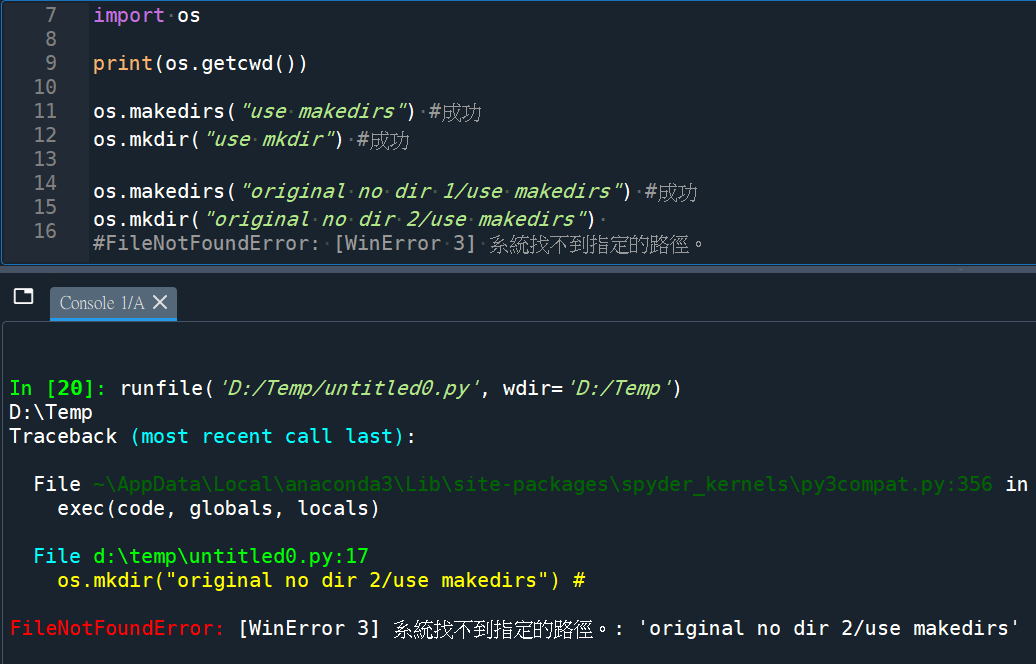
d:\Temp :
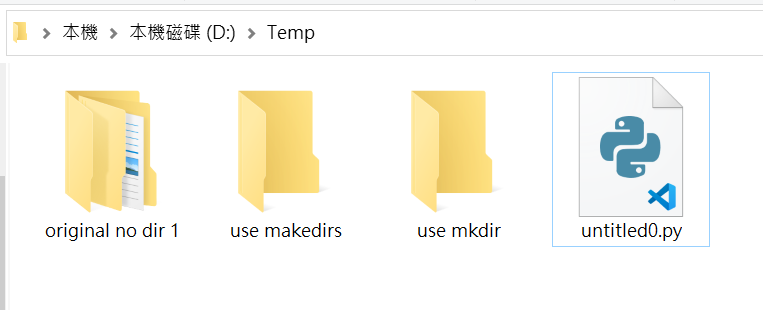
d:\Temp 資料夾是存在的os.makedirs("use makedirs") #成功os.mkdir("use mkdir") #成功
兩行都成功建立新資料夾os.makedirs("original no dir 1/use makedirs") #成功
“original no dir 1” 資料夾並不存在os.makedirs() 可以成功建立
original no dir 1/use makedirs
資料夾中還有子資料夾
但os.mkdir()
因為資料夾”original no dir 2″不存在
拋出error:
FileNotFoundError: [WinError 3] 系統找不到指定的路徑。: ‘original no dir 2/use makedirs’
使用 os.makedirs() 比較安全。因為 os.mkdir() 只會建立指定的目錄,如果指定的目錄中包含其他不存在的目錄,則會失敗。而 os.makedirs() 會遞迴建立所有不存在的目錄,直到指定的目錄都存在為止。
推薦hahow線上學習python: https://igrape.net/30afN


![Python: pandas.DataFrame 如何找出重複值並計算重複次數? counts = df[duplicates] .groupby([‘name’]) .size() .reset_index(name=’count’)](https://i1.wp.com/savingking.com.tw/wp-content/uploads/2023/03/20230316131103_65.png?quality=90&zoom=2&ssl=1&resize=350%2C233 "Python: pandas.DataFrame 如何找出重複值並計算重複次數? counts = df[duplicates] .groupby([‘name’]) .size() .reset_index(name=’count’)")


![別把中文洗掉:Python `isalnum()` vs `[^A-Za-z0-9]` 含/不含 CJK中日韓](https://i1.wp.com/savingking.com.tw/wp-content/uploads/2026/05/20260525082752_0_4776cd.png?quality=90&zoom=2&ssl=1&resize=350%2C233 "別把中文洗掉:Python `isalnum()` vs `[^A-Za-z0-9]` 含/不含 CJK中日韓")



近期留言