


Python TQC考題410 繪製等腰三角形
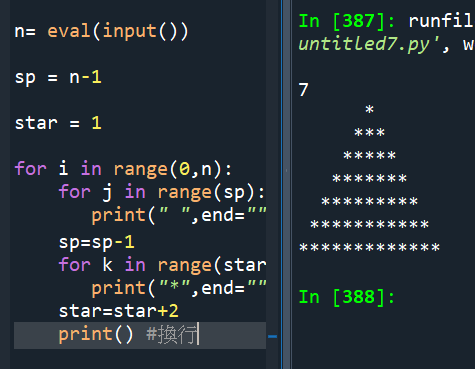
n= eval(input())
sp = n-1
star = 1
for i in range(0,n):
for j in range(sp):
print(” “,end=””) #不換行
sp=sp-1 #屬於i的for迴圈
for k in range(star):
print(“*”,end=””) #,end=””不會多出空白了,也不會換行
star=star+2 #屬於i的for迴圈
print() #換行,屬於i的for迴圈
#這一題縮排很重要
#第二次做
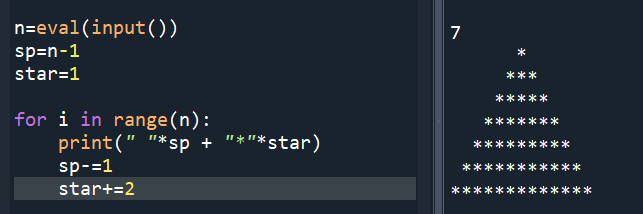
#三個for迴圈太惱人,純屬秀技術
n=eval(input())
sp=n-1
star=1
for i in range(n):
print(” “*sp + “*”*star)
sp-=1
star+=2
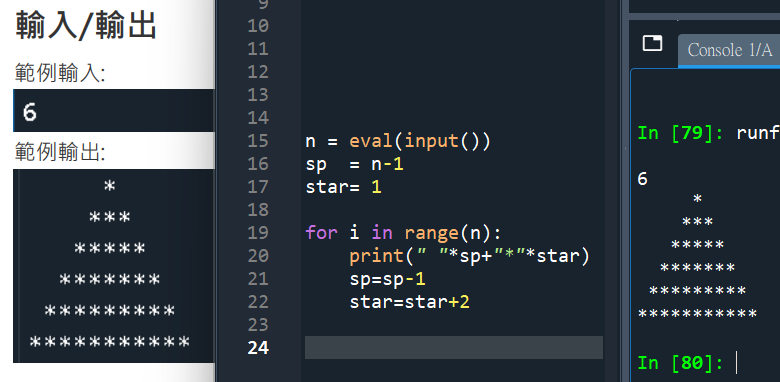
#題目要求是輸入6:
n = eval(input())
sp = n-1
star= 1
for i in range(n):
print(” “*sp+”*”*star)
sp=sp-1
star=star+2


![Python:如何用pandas.concat() 合併兩個DataFrame並重置index? pd.concat([df1, df2]) .reset_index(drop=True) ; pd.concat([df1, df2], ignore_index=True)](https://i2.wp.com/savingking.com.tw/wp-content/uploads/2023/03/20230311123232_5.png?quality=90&zoom=2&ssl=1&resize=350%2C233 "Python:如何用pandas.concat() 合併兩個DataFrame並重置index? pd.concat([df1, df2]) .reset_index(drop=True) ; pd.concat([df1, df2], ignore_index=True)")
![Python 表達式中的魔法:用海象運算子讓斷詞程式碼更乾淨 [w_clean for w in words if (w_clean:=w.lower().strip()) and w_clean not in STOPWORDS]](https://i0.wp.com/savingking.com.tw/wp-content/uploads/2026/02/20260210083748_0_a7d9bf.png?quality=90&zoom=2&ssl=1&resize=350%2C233 "Python 表達式中的魔法:用海象運算子讓斷詞程式碼更乾淨 [w_clean for w in words if (w_clean:=w.lower().strip()) and w_clean not in STOPWORDS]")


![為什麼 Python 要用 `max` 配合 `key=lambda`?從找最長文字的 Span 談起 ; #spans:list[dict] ; max(spans, key=lambda s: len(s.get("text", ""))) - 儲蓄保險王](https://savingking.com.tw/wp-content/uploads/2026/06/20260602132524_0_c45d06-520x245.png)

近期留言