


code:
# -*- coding: utf-8 -*-
"""
Created on Thu Sep  5 20:21:03 2024

@author: SavingKing
"""

from pydub import AudioSegment
from pydub.silence import split_on_silence
import os
import time

def mkdir_export(dirname, strr="export"):
    dirname_export = os.path.join(dirname, strr)
    if not os.path.exists(dirname_export):
        os.mkdir(dirname_export)
        print(f"已經建立資料夾: {dirname_export}")
    else:
        print(f"資料夾已經存在: {dirname_export}")
    return dirname_export

dirname = r"P:\My Documents\Jeff\錄音\copy\Jeff240606"
basename_wav = "Jeff240606.wav"
path_wav = os.path.join(dirname, basename_wav)

dir_split = mkdir_export(dirname, strr="split")

# 加载音频文件
audio = AudioSegment.from_wav(path_wav)

start_time = time.time()
print("分割音檔中...")
# 使用静默检测来分割音频
chunks = split_on_silence(
    audio,
    min_silence_len=500,  # 至少需要持续半秒的静默才视为分割点
    silence_thresh=audio.dBFS-14,  # 小于-70 dBFS 的静默视为静默
    #静音阈值是当前音频文件平均分贝(dBFS)减去 14 dB。
    #这是一个相对值,依赖于原始音频文件的平均音量水平。
    keep_silence=500,  # 保留静默500毫秒到分割的音频片段
)
#type(chunks[0])
#Out[13]: pydub.audio_segment.AudioSegment

basename_main = os.path.splitext(basename_wav)[0]
# 处理每个分割后的音频片段
for i, chunk in enumerate(chunks):
    out_file = f"{basename_main}_{i}.wav"
    #out_file = f"chunk{i}.wav"
    print(f"正在處理 {out_file}")
    chunk.export(os.path.join(dir_split, out_file), format="wav")

end_time = time.time()
elapsed_time = end_time - start_time
print(f"分割的音檔已經輸出到 {dir_split}")
print(f"耗时 {round(elapsed_time, 2)} 秒")
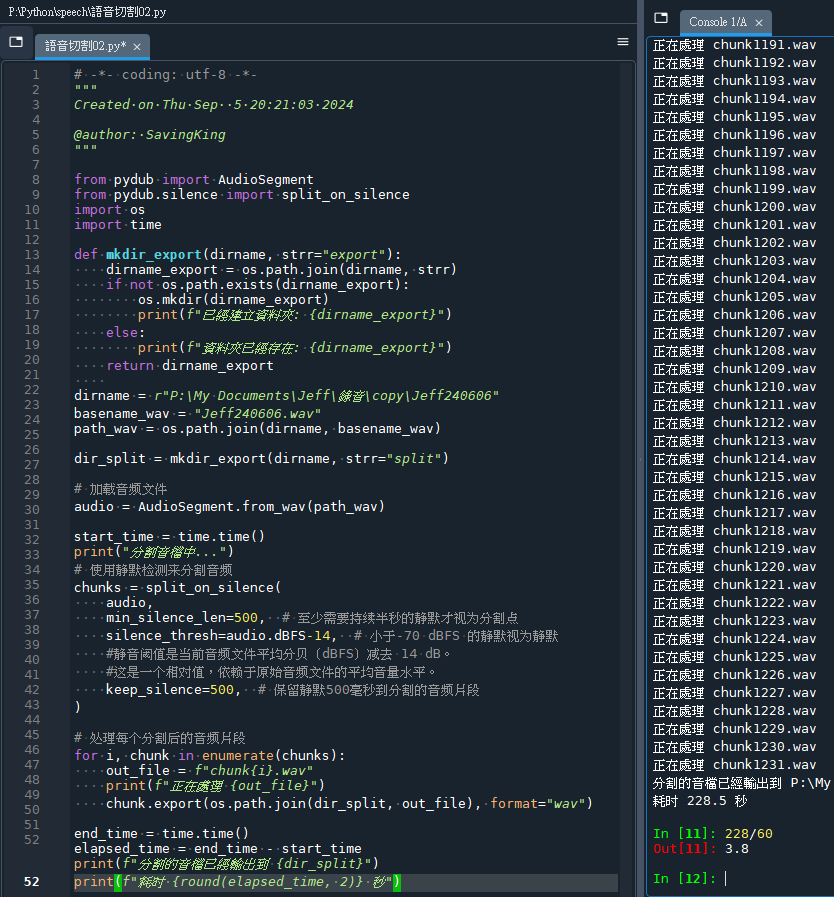
輸出結果:
推薦hahow線上學習python: https://igrape.net/30afN

![Python struct.pack() 將整數轉換為bytes ; while list: str1=list[0] ; 中間內容; list=[1:] #切片 ,遍歷list中的每一個元素,跟for i in list 類似 ; timeit() #計時](https://i0.wp.com/savingking.com.tw/wp-content/uploads/2022/10/20221012095050_42.png?quality=90&zoom=2&ssl=1&resize=350%2C233 "Python struct.pack() 將整數轉換為bytes ; while list: str1=list[0] ; 中間內容; list=[1:] #切片 ,遍歷list中的每一個元素,跟for i in list 類似 ; timeit() #計時")
![Python: pandas.DataFrame如何移除所有空白列?if df_raw.iloc[r,0] is np.nan: nanLst.append(r) ; df_drop0 = df_raw.drop(nanLst,axis=0) ; pandas.isna() ;df_drop0 = df_raw.drop(nanLst,axis=0).reset_index(drop=True)](https://i0.wp.com/savingking.com.tw/wp-content/uploads/2022/12/20221206144233_67.png?quality=90&zoom=2&ssl=1&resize=350%2C233 "Python: pandas.DataFrame如何移除所有空白列?if df_raw.iloc[r,0] is np.nan: nanLst.append(r) ; df_drop0 = df_raw.drop(nanLst,axis=0) ; pandas.isna() ;df_drop0 = df_raw.drop(nanLst,axis=0).reset_index(drop=True)")



近期留言