

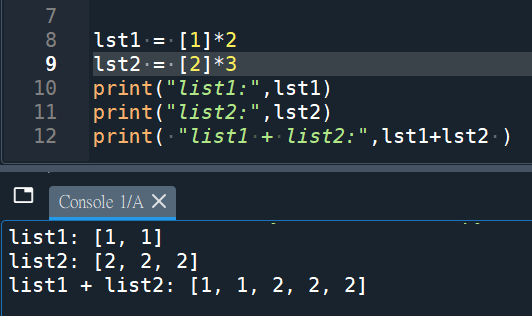
lst1 = [1]*2
lst2 = [2]*3
print(“list1:”,lst1)
print(“list2:”,lst2)
print( “list1 + list2:”,lst1+lst2 )
#不要誤以為兩LIST的元素相加
#減法跟除法不行
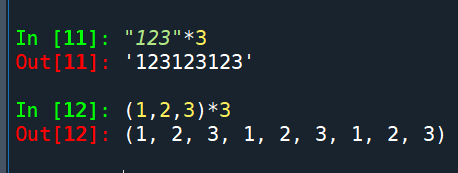
string跟tuple也可以*int:
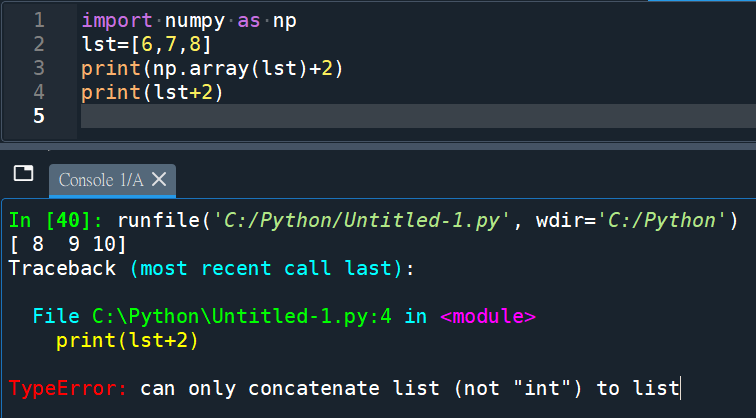
list不能+整數,
#TypeError: can only concatenate list (not “int”) to list
#只能加另外一個list
#但array可以:
#加減乘除都可以,對元素做運算
#concatenate: 連接
ndarray.tolist()可以將array轉為list
有的動作只有list才能做
有的動作只有array才能做
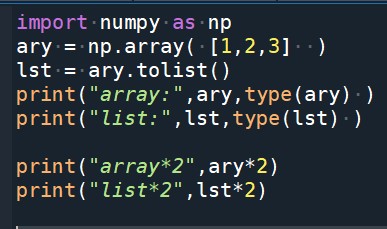
一樣*2,
array跟list會做不一樣的動作:
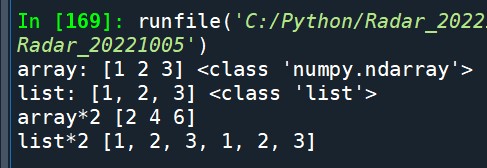
輸出結果:
![Excel TQC考題208: Competition,自訂格式: [<=50]0; 頁面配置>版面設定 展開>頁首/頁尾 Excel TQC考題208: Competition,自訂格式: [<=50]0; 頁面配置>版面設定 展開>頁首/頁尾](https://i2.wp.com/savingking.com.tw/wp-content/uploads/2022/04/20220411102844_81.png?quality=90&zoom=2&ssl=1&resize=350%2C233)


![Python: matplotlib如何設定座標軸刻度? plt.xticks(seq, labels) ;如何生成fig, ax物件? fig = plt.figure(figsize= (10.24, 7.68)) ; ax = fig.add_subplot() ; fig, ax = plt.subplots(figsize=(10.24, 7.68)) ; 如何使用中文? plt.rcParams[“font.family”] = [“Microsoft JhengHei”] Python: matplotlib如何設定座標軸刻度? plt.xticks(seq, labels) ;如何生成fig, ax物件? fig = plt.figure(figsize= (10.24, 7.68)) ; ax = fig.add_subplot() ; fig, ax = plt.subplots(figsize=(10.24, 7.68)) ; 如何使用中文? plt.rcParams[“font.family”] = [“Microsoft JhengHei”]](https://i2.wp.com/savingking.com.tw/wp-content/uploads/2023/02/20230209083006_41.png?quality=90&zoom=2&ssl=1&resize=350%2C233)

![Python 讀取 DOCX 圖片關聯:qn+find/findall 與 XPath 的實戰對照 from lxml import etree ; from docx.oxml.ns import qn; lxml.etree._Element.findall( f”.//{ qn(‘a:blip’) }” ) ; .get( qn(“r:embed”) ) #獲取 屬性名 ‘r:embed’ 的 屬性值(如: ‘rId4’) ; lxml.etree._Element.xpath( “//a:blip/@r:embed”, namespaces = NS) #/@r:embed = 獲取 屬性名 ‘r:embed’ 的 屬性值(如: ‘rId4’),使用.findall() 要先.findall()獲取List[_Element],再迴圈_Element.get()獲取屬性值, .xpath() 第一個參數path 使用”//a:blip/@r:embed” ,可直接獲取屬性值(List[str]如: [‘rId4’, ‘rId5’]) ; 如何對docx真實移除圖片瘦身? Python 讀取 DOCX 圖片關聯:qn+find/findall 與 XPath 的實戰對照 from lxml import etree ; from docx.oxml.ns import qn; lxml.etree._Element.findall( f”.//{ qn(‘a:blip’) }” ) ; .get( qn(“r:embed”) ) #獲取 屬性名 ‘r:embed’ 的 屬性值(如: ‘rId4’) ; lxml.etree._Element.xpath( “//a:blip/@r:embed”, namespaces = NS) #/@r:embed = 獲取 屬性名 ‘r:embed’ 的 屬性值(如: ‘rId4’),使用.findall() 要先.findall()獲取List[_Element],再迴圈_Element.get()獲取屬性值, .xpath() 第一個參數path 使用”//a:blip/@r:embed” ,可直接獲取屬性值(List[str]如: [‘rId4’, ‘rId5’]) ; 如何對docx真實移除圖片瘦身?](https://i1.wp.com/savingking.com.tw/wp-content/uploads/2025/11/20251119130848_0_3fbf6b.png?quality=90&zoom=2&ssl=1&resize=350%2C233)


近期留言