


#Python TQC考題905 字串資料刪除,datanew=data.replace(strold,strnew), f.write(datanew)
“””
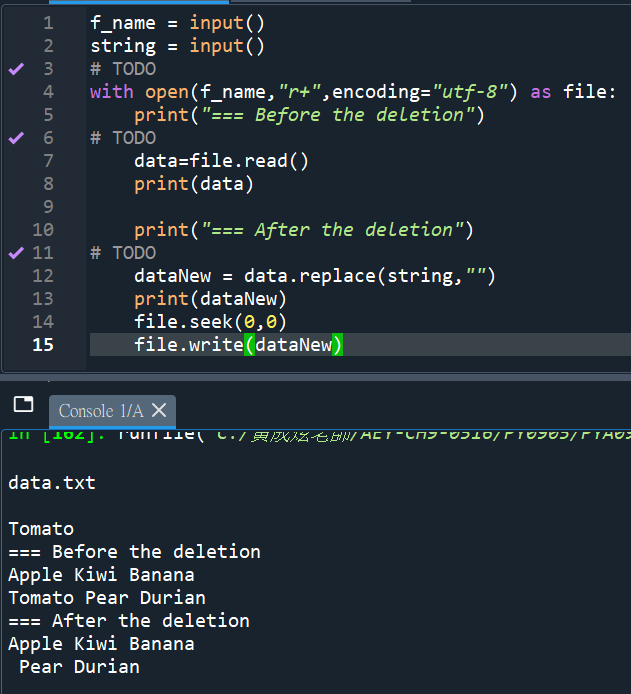
txt檔內容如下:
Apple Kiwi Banana
Tomato Pear Durian
要將Tomato刪除
.replace(“Tomato”,””)
將Tomato換成什麼都沒有
“””
f_name = input()
string = input()
# TODO
with open(f_name,”r+”,encoding=”utf-8″) as file:
print(“=== Before the deletion”)
# TODO
data=file.read()
print(data)
print(“=== After the deletion”)
# TODO
dataNew = data.replace(string,””)
print(dataNew)
file.seek(0,0)
file.write(dataNew)


![Python: pandas.DataFrame([ ]) 與 pandas.DataFrame([[ ]]) 的差別? 如何為DataFrame增加首列?](https://i2.wp.com/savingking.com.tw/wp-content/uploads/2023/03/20230313160116_63.png?quality=90&zoom=2&ssl=1&resize=350%2C233 "Python: pandas.DataFrame([ ]) 與 pandas.DataFrame([[ ]]) 的差別? 如何為DataFrame增加首列?")


![Python-docx 圖片提取完全指南:從 rId 到二進位資料的探險rid ; part = doc.part.rels[rid].target_part #return part.blob if “ImagePart” in type(part).__name__ else None](https://i1.wp.com/savingking.com.tw/wp-content/uploads/2026/01/20260113135812_0_8fa645.png?quality=90&zoom=2&ssl=1&resize=350%2C233 "Python-docx 圖片提取完全指南:從 rId 到二進位資料的探險rid ; part = doc.part.rels[rid].target_part #return part.blob if “ImagePart” in type(part).__name__ else None")

![別把中文洗掉:Python `isalnum()` vs `[^A-Za-z0-9]` 含/不含 CJK中日韓](https://i0.wp.com/savingking.com.tw/wp-content/uploads/2026/05/20260525082752_0_4776cd.png?quality=90&zoom=2&ssl=1&resize=350%2C233 "別把中文洗掉:Python `isalnum()` vs `[^A-Za-z0-9]` 含/不含 CJK中日韓")


近期留言