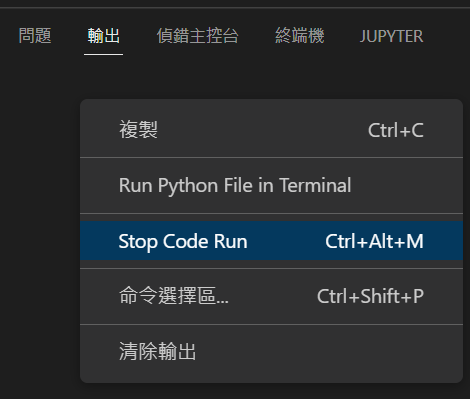
Python: Visual Studio Code如何強制終止程式?終端機位置,滑鼠右鍵 > Stop Code Run (快捷鍵: Ctrl + Alt + M) by 儲蓄保險王 · 2022-09-08 在終端機位置 滑鼠右鍵 > Stop Code Run (快捷鍵: Ctrl + Alt + M) 相關文章Python如何輸出多分頁的xlsx? with pandas .ExcelWriter ("output.xlsx") as writer:Python TQC考題108座標距離計算,import math, math.sqrt(), math.pow()Excel TQC考題104: 在職訓練班學生選課資料內容,DATEDIF, TODAY()Python: pandas.DataFrame()處理雙維度資料,dict跟2D list轉為DataFrame有何差別?如何用index及columns屬性客製化index跟欄位名稱?df.index = ["一","二","三","四"] ; df.columns = 使用.head(n) ; .tail(m) ;取首n列,尾m列; .at[index,欄位名稱] 取單一資料 ; .iat[index,欄位順序] 取單一資料 ; .loc[index,欄位名稱] 取資料 ; .iloc[index,欄位順序];df.iloc[ [0,1],[0,2]])取資料 ; df.iloc[ 0:3,0:2]切片Python Pathlib 實戰:優雅地篩選多種圖片檔案; images = [f for f in p.glob("*") if f.suffix.lower() in img_extensions]Python 進階心法:告別 Else,讓程式碼「平」易近人Excel TQC考題202: 快樂小學學生名冊,自訂格式:0"公斤";[紅色]"減"0"公斤";[藍色]"完美身材"Python: Visual Studio Code (VS code) & Spyder 如何切換不同版本的Python直譯器( Interpreter ), VS code: 齒輪>命令選擇區(Ctrl + Shift +P) > Python: Select Interpreter #Spyder console: !where python #知道自己安裝的python路徑Python: Visual Studio Code (VS code) 程式碼input(),終端機卻無法輸入資料且顯示亂碼,該如何設定?齒輪 > 設定,搜尋: run in terminal, 打勾: Wether to run code in integrated Terminal.
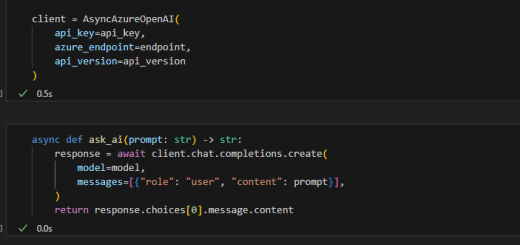
0 Python 教學:在 Jupyter Notebook 使用 Azure OpenAI Async Client(非同步呼叫)from openai import AsyncAzureOpenAI 2025-08-31






![Python: pandas.DataFrame()處理雙維度資料,dict跟2D list轉為DataFrame有何差別?如何用index及columns屬性客製化index跟欄位名稱?df.index = [“一”,”二”,”三”,”四”] ; df.columns = 使用.head(n) ; .tail(m) ;取首n列,尾m列; .at[index,欄位名稱] 取單一資料 ; .iat[index,欄位順序] 取單一資料 ; .loc[index,欄位名稱] 取資料 ; .iloc[index,欄位順序];df.iloc[ [0,1],[0,2]])取資料 ; df.iloc[ 0:3,0:2]切片](https://i0.wp.com/savingking.com.tw/wp-content/uploads/2022/11/20221111093547_79.png?quality=90&zoom=2&ssl=1&resize=350%2C233 "Python: pandas.DataFrame()處理雙維度資料,dict跟2D list轉為DataFrame有何差別?如何用index及columns屬性客製化index跟欄位名稱?df.index = [“一”,”二”,”三”,”四”] ; df.columns = 使用.head(n) ; .tail(m) ;取首n列,尾m列; .at[index,欄位名稱] 取單一資料 ; .iat[index,欄位順序] 取單一資料 ; .loc[index,欄位名稱] 取資料 ; .iloc[index,欄位順序];df.iloc[ [0,1],[0,2]])取資料 ; df.iloc[ 0:3,0:2]切片")
![Python Pathlib 實戰:優雅地篩選多種圖片檔案; images = [f for f in p.glob(“*”) if f.suffix.lower() in img_extensions]](https://i1.wp.com/savingking.com.tw/wp-content/uploads/2026/01/20260128111659_0_736612.png?quality=90&zoom=2&ssl=1&resize=350%2C233 "Python Pathlib 實戰:優雅地篩選多種圖片檔案; images = [f for f in p.glob(“*”) if f.suffix.lower() in img_extensions]")

![Excel TQC考題202: 快樂小學學生名冊,自訂格式:0″公斤”;[紅色]”減”0″公斤”;[藍色]”完美身材”](https://i1.wp.com/savingking.com.tw/wp-content/uploads/2022/04/20220410142405_70.png?quality=90&zoom=2&ssl=1&resize=350%2C233 "Excel TQC考題202: 快樂小學學生名冊,自訂格式:0″公斤”;[紅色]”減”0″公斤”;[藍色]”完美身材”")



近期留言