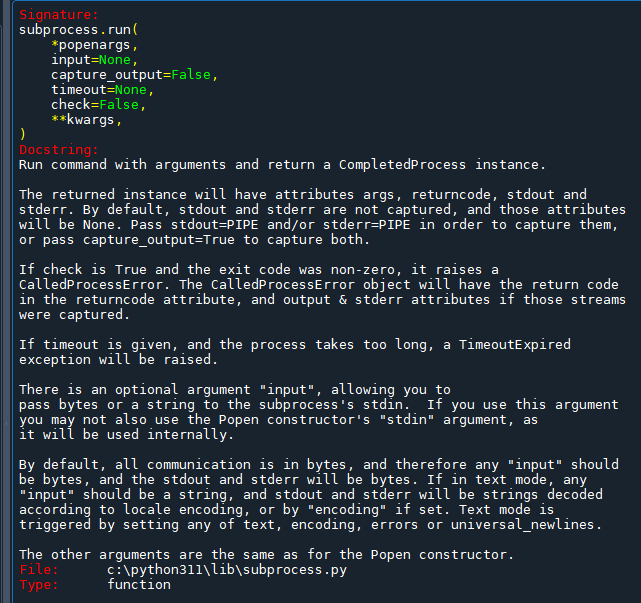
subprocess.run()函数的功能是运行命令并返回一个CompletedProcess` 实例。
返回的实例将具有 args、returncode、stdout 和 stderr 属性。默认情况下,stdout 和 stderr 不被捕获,这些属性将为 None。要捕获它们,请传递 stdout=PIPE 和/或 stderr=PIPE,或者传递 capture_output=True 以同时捕获两者。
如果 check 为 True 并且退出代码非零,则它会引发 CalledProcessError。CalledProcessError 对象将在 returncode 属性中包含退出代码,以及输出和 stderr 属性(如果捕获了这些流)。
如果给定了 timeout,并且进程花费的时间太长,则会引发 TimeoutExpired 异常。
有一个可选参数 "input",允许您将字节或字符串传递给子进程的 stdin。如果您使用此参数,则不能同时使用 Popen 构造函数的 "stdin" 参数,因为它将在内部使用。
默认情况下,所有通信都是以字节为单位的,因此任何 "input" 都应该是字节,stdout 和 stderr 都应该是字节。如果处于文本模式,任何 "input" 都应该是一个字符串,stdout 和 stderr 将根据区域设置编码或通过设置 "encoding" 进行解码的字符串。文本模式可以通过设置 text、encoding、errors 或 universal_newlines 中的任何一个来触发。
推薦hahow線上學習python: https://igrape.net/30afN

![Word短篇文件編輯,TQC考題110:重點摘要與評量, \[(*)\] 萬用字元,格式>醒目提示*2次=非醒目提示 Word短篇文件編輯,TQC考題110:重點摘要與評量, \[(*)\] 萬用字元,格式>醒目提示*2次=非醒目提示](https://i1.wp.com/savingking.com.tw/wp-content/uploads/2022/03/20220322172253_75.png?quality=90&zoom=2&ssl=1&resize=350%2C233)
![Python: pandas.DataFrame 如何找出重複值並計算重複次數? counts = df[duplicates] .groupby([‘name’]) .size() .reset_index(name=’count’) Python: pandas.DataFrame 如何找出重複值並計算重複次數? counts = df[duplicates] .groupby([‘name’]) .size() .reset_index(name=’count’)](https://i2.wp.com/savingking.com.tw/wp-content/uploads/2023/03/20230316131103_65.png?quality=90&zoom=2&ssl=1&resize=350%2C233)


![Python struct.pack() 將整數轉換為bytes ; while list: str1=list[0] ; 中間內容; list=[1:] #切片 ,遍歷list中的每一個元素,跟for i in list 類似 ; timeit() #計時 Python struct.pack() 將整數轉換為bytes ; while list: str1=list[0] ; 中間內容; list=[1:] #切片 ,遍歷list中的每一個元素,跟for i in list 類似 ; timeit() #計時](https://i0.wp.com/savingking.com.tw/wp-content/uploads/2022/10/20221012095050_42.png?quality=90&zoom=2&ssl=1&resize=350%2C233)

![Python: matplotlib繪製出的圖表如何插入背景圖? img = plt.imread(‘background_image.png’) ; ax.imshow(img, extent=[0, 10, -1.2, 1.2], aspect=’auto’, alpha=0.5) Python: matplotlib繪製出的圖表如何插入背景圖? img = plt.imread(‘background_image.png’) ; ax.imshow(img, extent=[0, 10, -1.2, 1.2], aspect=’auto’, alpha=0.5)](https://i2.wp.com/savingking.com.tw/wp-content/uploads/2023/02/20230216183536_29.png?quality=90&zoom=2&ssl=1&resize=350%2C233)

近期留言