


re.match()
匹配行為:只嘗試在字符串的開頭進行匹配。
用法:如果正則模式必須從字符串的開頭開始匹配,使用 re.match()。
局限性:如果目標匹配的內容不在字符串的開頭,re.match() 將返回 None。
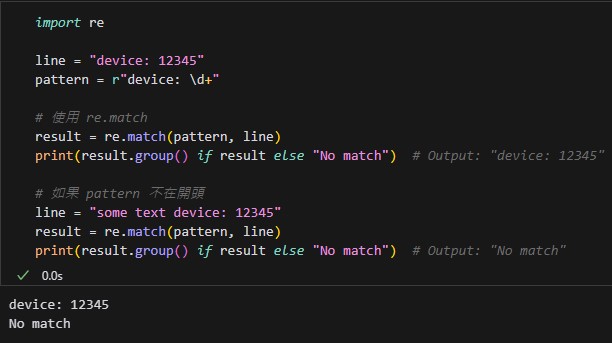
import re

line = "device: 12345"
pattern = r"device: \d+"

# 使用 re.match
result = re.match(pattern, line)
print(result.group() if result else "No match")  # Output: "device: 12345"

# 如果 pattern 不在開頭
line = "some text device: 12345"
result = re.match(pattern, line)
print(result.group() if result else "No match")  # Output: "No match"
輸出結果:
re.search()
匹配行為:搜索整個字符串,找到匹配的第一個位置(無論是否在開頭)。
用法:如果匹配的內容可能出現在字符串的任意位置,使用 re.search()。
靈活性:它遍歷整個字符串,因此適合處理更複雜的場景。
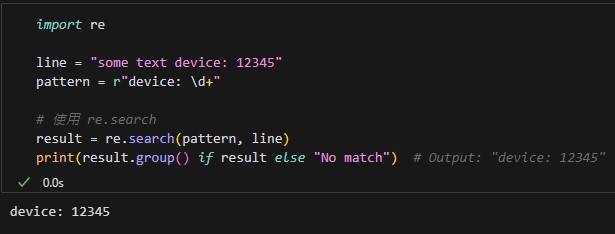
import re

line = "some text device: 12345"
pattern = r"device: \d+"

# 使用 re.search
result = re.search(pattern, line)
print(result.group() if result else "No match")  # Output: "device: 12345"
輸出結果:
re.match() 更高效:
因為它只檢查字符串的開頭,而不會掃描整個字符串,因此在匹配必須從開頭開始的情況下,re.match() 的性能會略優於 re.search()。
如果你知道目標內容一定出現在開頭,優先使用 re.match()。
re.search() 更靈活,但稍慢:
它會掃描整個字符串,直到找到匹配,因此在處理長字符串時,性能可能稍差。
re.match():
適用於目標內容必須出現在字符串的開頭。
更高效,但只能匹配開頭部分。
re.search():
適用於目標內容可能出現在字符串的任意位置。
更靈活,但性能稍遜。
速記法:
re.search() 長度比 re.match() 長:這意味著 search 能夠在整個字符串中進行匹配,而 match 只匹配字符串開頭。
re.match()
“短”:只匹配字符串的開頭部分。
用於檢查字符串是否從開頭匹配某個模式。
re.search()
“長”:掃描整個字符串,找到第一個匹配的結果。
能夠匹配到字符串中任意位置的內容。
search 更靈活,能匹配到「更多(長度更長)」的內容。
match 更局限,只匹配「開頭(短的地方)」的內容。
推薦hahow線上學習python: https://igrape.net/30afN


![Python 讀取 DOCX 圖片關聯:qn+find/findall 與 XPath 的實戰對照 from lxml import etree ; from docx.oxml.ns import qn; lxml.etree._Element.findall( f”.//{ qn(‘a:blip’) }” ) ; .get( qn(“r:embed”) ) #獲取 屬性名 ‘r:embed’ 的 屬性值(如: ‘rId4’) ; lxml.etree._Element.xpath( “//a:blip/@r:embed”, namespaces = NS) #/@r:embed = 獲取 屬性名 ‘r:embed’ 的 屬性值(如: ‘rId4’),使用.findall() 要先.findall()獲取List[_Element],再迴圈_Element.get()獲取屬性值, .xpath() 第一個參數path 使用”//a:blip/@r:embed” ,可直接獲取屬性值(List[str]如: [‘rId4’, ‘rId5’]) ; 如何對docx真實移除圖片瘦身?](https://i2.wp.com/savingking.com.tw/wp-content/uploads/2025/11/20251119130848_0_3fbf6b.png?quality=90&zoom=2&ssl=1&resize=350%2C233 "Python 讀取 DOCX 圖片關聯:qn+find/findall 與 XPath 的實戰對照 from lxml import etree ; from docx.oxml.ns import qn; lxml.etree._Element.findall( f”.//{ qn(‘a:blip’) }” ) ; .get( qn(“r:embed”) ) #獲取 屬性名 ‘r:embed’ 的 屬性值(如: ‘rId4’) ; lxml.etree._Element.xpath( “//a:blip/@r:embed”, namespaces = NS) #/@r:embed = 獲取 屬性名 ‘r:embed’ 的 屬性值(如: ‘rId4’),使用.findall() 要先.findall()獲取List[_Element],再迴圈_Element.get()獲取屬性值, .xpath() 第一個參數path 使用”//a:blip/@r:embed” ,可直接獲取屬性值(List[str]如: [‘rId4’, ‘rId5’]) ; 如何對docx真實移除圖片瘦身?")


![Python網路爬蟲requests 如何下載台灣證交所的opendata? rawData = requests. get (inputs) #<Response [200]> - 儲蓄保險王](https://savingking.com.tw/wp-content/uploads/2022/10/20221004135740_43-520x245.png)

近期留言