


在 Python 的正則表達式模組中,
re.Match 物件的 .group() 方法行為是固定的,
.group(0) 和 .group(1) 的作用完全不同,
它們並不相同
.group(0) #等效於.group()
表示整個正則表達式匹配到的內容。
它返回的是整個匹配字符串,
無論正則表達式中有多少捕獲組(括號 ())。
輸出類型:一個 str
.group(1)
表示第一個捕獲組(())匹配到的內容。
如果正則表達式中帶有捕獲組(即括號 ()),
.group(1) 會返回第一個捕獲組內匹配的內容。
輸出類型:一個 str
有捕獲組的正則表達式
假設你有以下字符串和正則表達式:
import re

line = "device: 1"
pattern = r"device: (\d+)"  # 捕獲數字部分
device_match = re.search(pattern, line)

if device_match:
    print(".group(0):", device_match.group(0))  # 整個匹配結果
print(".group(1):", device_match.group(1)) # 第一個捕獲組輸出結果:
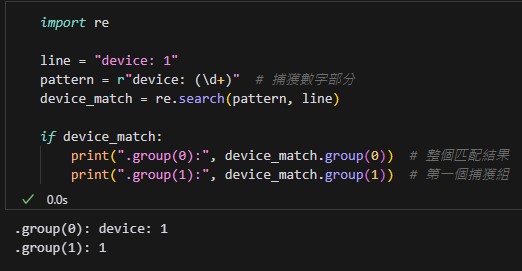
.group(0) 返回的是整個正則表達式匹配的內容 “device: 1″。
.group(1) 返回的是第一個捕獲組,即括號 () 匹配到的內容 “1”。
沒有捕獲組的正則表達式
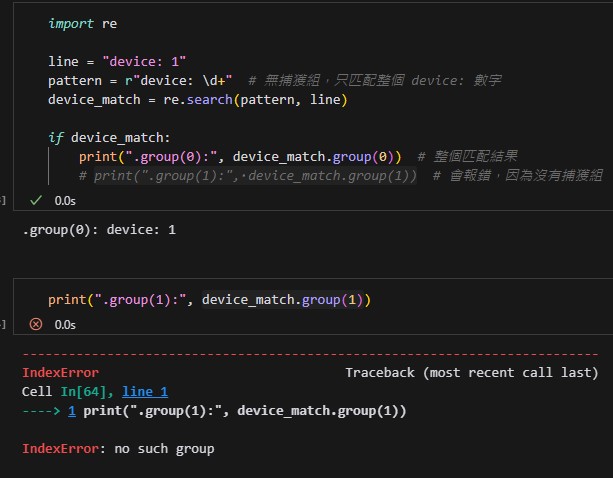
如果正則表達式中沒有捕獲組,
只有 .group(0) 有效,因為 .group(1) 將導致錯誤:
捕獲組數量多的情況
如果正則表達式中有多個捕獲組,
.group(n) 可以提取對應的捕獲組內容:
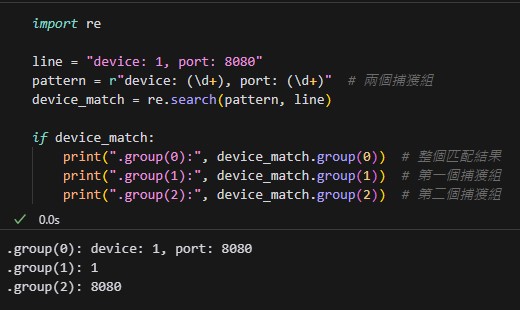
.group(0):返回整個匹配的內容。
.group(1):返回第一個捕獲組匹配的內容,即 1。
.group(2):返回第二個捕獲組匹配的內容,即 8080。
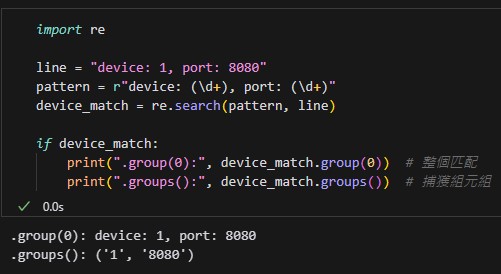
正則表達式的 re.Match 物件中,
只有 .groups() 會返回所有捕獲組的元組(tuple)
.groups()
.group(0) 和 .group(1) 的區別:
.group(0):整個正則表達式的匹配結果。
.group(1):第一個捕獲組的匹配內容。
數據類型:
.group(0) 和 .group(1) 都返回 str
推薦hahow線上學習python: https://igrape.net/30afN


![Python: list.index() 只能找到第一個元素的index,若元素有重複,如何找出所有index? indexes = [index for index, value in enumerate(my_list) if value == target]](https://i2.wp.com/savingking.com.tw/wp-content/uploads/2024/10/20241010101216_0_12b6c0.png?quality=90&zoom=2&ssl=1&resize=350%2C233 "Python: list.index() 只能找到第一個元素的index,若元素有重複,如何找出所有index? indexes = [index for index, value in enumerate(my_list) if value == target]")


![Python TQC考題404 數字反轉判斷,n_rev=n[::-1], list1.reverse()](https://i0.wp.com/savingking.com.tw/wp-content/uploads/2022/04/20220825152414_97.png?quality=90&zoom=2&ssl=1&resize=350%2C233 "Python TQC考題404 數字反轉判斷,n_rev=n[::-1], list1.reverse()")



近期留言