

#Python dict()製作menu
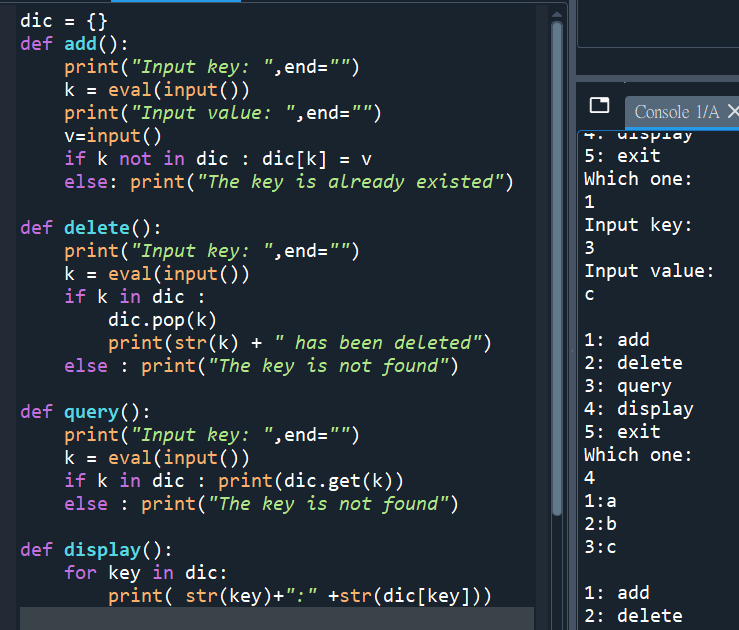
dic = {}
def add():
print(“Input key: “,end=””)
k = eval(input())
print(“Input value: “,end=””)
v=input()
if k not in dic : dic[k] = v
else: print(“The key is already existed”)
def delete():
print(“Input key: “,end=””)
k = eval(input())
if k in dic :
dic.pop(k)
print(str(k) + ” has been deleted”)
else : print(“The key is not found”)
def query():
print(“Input key: “,end=””)
k = eval(input())
if k in dic : print(dic.get(k))
else : print(“The key is not found”)
def display():
for key in dic:
print( str(key)+”:” +str(dic[key]))
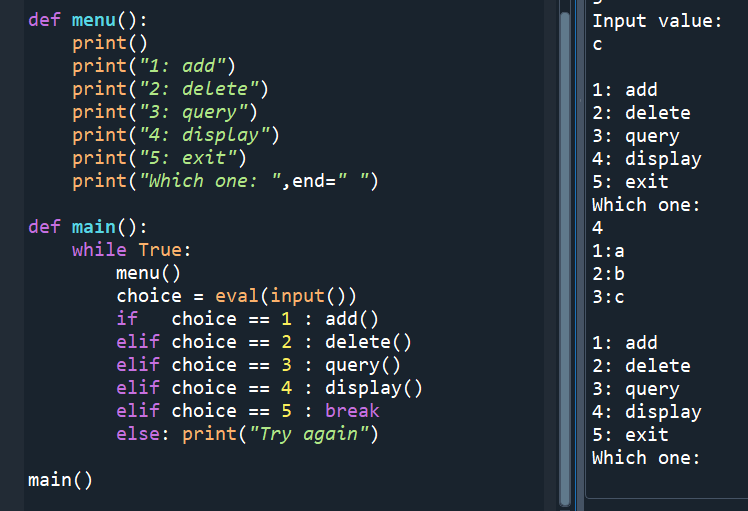
def menu():
print()
print(“1: add”)
print(“2: delete”)
print(“3: query”)
print(“4: display”)
print(“5: exit”)
print(“Which one: “,end=” “)
def main():
while True:
menu()
choice = eval(input())
if choice == 1 : add()
elif choice == 2 : delete()
elif choice == 3 : query()
elif choice == 4 : display()
elif choice == 5 : break
else: print(“Try again”)
main()

![Python-docx 圖片提取完全指南:從 rId 到二進位資料的探險rid ; part = doc.part.rels[rid].target_part #return part.blob if “ImagePart” in type(part).__name__ else None Python-docx 圖片提取完全指南:從 rId 到二進位資料的探險rid ; part = doc.part.rels[rid].target_part #return part.blob if “ImagePart” in type(part).__name__ else None](https://i0.wp.com/savingking.com.tw/wp-content/uploads/2026/01/20260113135812_0_8fa645.png?quality=90&zoom=2&ssl=1&resize=350%2C233)


![Python: 如何使用numpy.newaxis 增加資料的維度? y = x[:, np.newaxis] Python: 如何使用numpy.newaxis 增加資料的維度? y = x[:, np.newaxis]](https://i0.wp.com/savingking.com.tw/wp-content/uploads/2023/03/20230313184351_57.png?quality=90&zoom=2&ssl=1&resize=350%2C233)


![使用 Python 檢驗字符串格式:掌握正則表達式(Regular Expression)的起始^與終止$符號, pattern = r’^GATR[0-9]{4}$’ 使用 Python 檢驗字符串格式:掌握正則表達式(Regular Expression)的起始^與終止$符號, pattern = r’^GATR[0-9]{4}$’](https://i0.wp.com/savingking.com.tw/wp-content/uploads/2024/07/20240712093637_0.png?quality=90&zoom=2&ssl=1&resize=350%2C233)

近期留言