


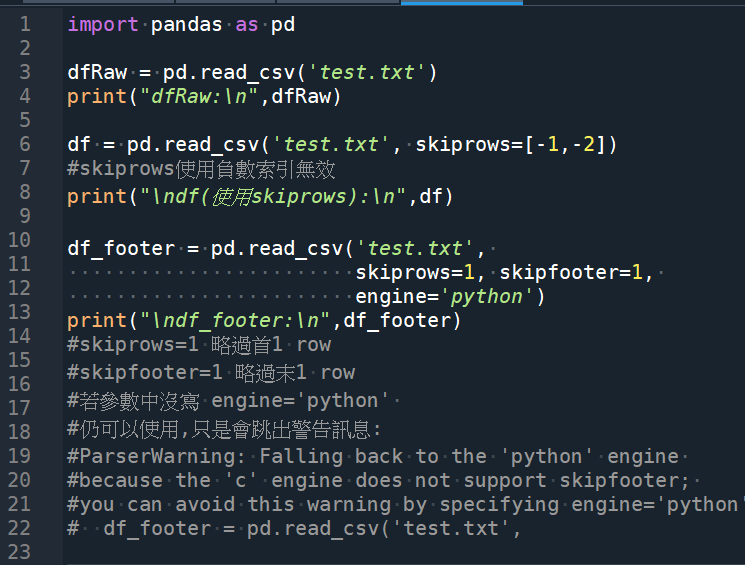
import pandas as pd
dfRaw = pd.read_csv(‘test.txt’)
print(“dfRaw:\n”,dfRaw)
df = pd.read_csv(‘test.txt’, skiprows=[-1,-2])
#skiprows使用負數索引無效
print(“\ndf(使用skiprows):\n”,df)
df_footer = pd.read_csv(‘test.txt’,
skiprows=1, skipfooter=1,
engine=’python’)
print(“\ndf_footer:\n”,df_footer)
“””
#skiprows=1 略過首1 row
#skipfooter=1 略過末1 row
#若參數中沒寫 engine=’python’
#仍可以使用,只是會跳出警告訊息:
#ParserWarning: Falling back to the ‘python’ engine
#because the ‘c’ engine does not support skipfooter;
#you can avoid this warning by specifying engine=’python’.
# df_footer = pd.read_csv(‘test.txt’,
engine='python'是因为默认情况下
Pandas使用的是C引擎解析CSV文件,
而skipfooter参数需要使用Python引擎才能生效。
“Footer” 可以翻譯為 “頁腳”,通常指網頁底部的區域,
包含版權聲明、聯絡資訊、隱私政策等相關資訊。”””
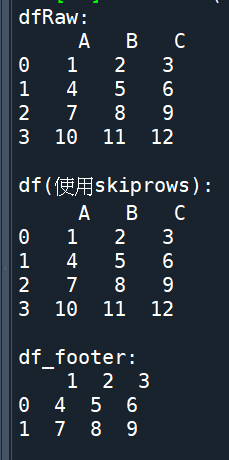
輸出結果:
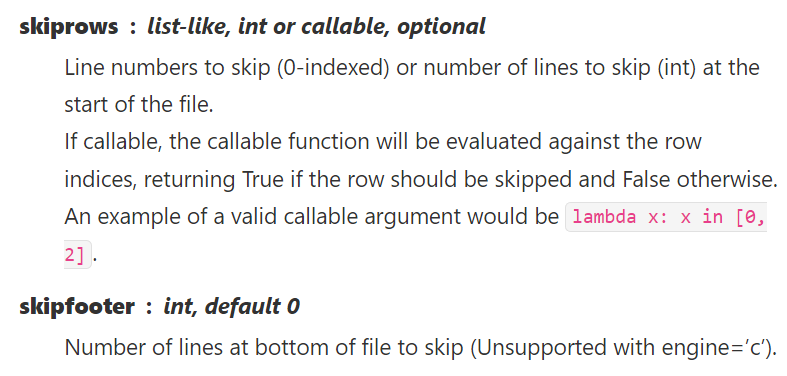
0-indexed 是指从0开始编号,而不是从1开始编号。在 Python 中,许多数据类型都是从0开始编号的,比如列表、字符串、元组等等。因此,当我们使用pandas中的skiprows参数时,需要将要跳过的行数按照行号从0开始进行指定。
推薦hahow線上學習python: https://igrape.net/30afN


![Python: 如何使用functools.reduce逐步縮減可迭代對象,合併為單個結果? import functools; product = functools.reduce( lambda x, y: x * y, numbers) ; reduce(function, sequence [, initial]) -> value ; map(function, iterable) ; filter(function, iterable) ; map ; filter](https://i0.wp.com/savingking.com.tw/wp-content/uploads/2023/06/20230626093403_49.png?quality=90&zoom=2&ssl=1&resize=350%2C233 "Python: 如何使用functools.reduce逐步縮減可迭代對象,合併為單個結果? import functools; product = functools.reduce( lambda x, y: x * y, numbers) ; reduce(function, sequence [, initial]) -> value ; map(function, iterable) ; filter(function, iterable) ; map ; filter")



近期留言