


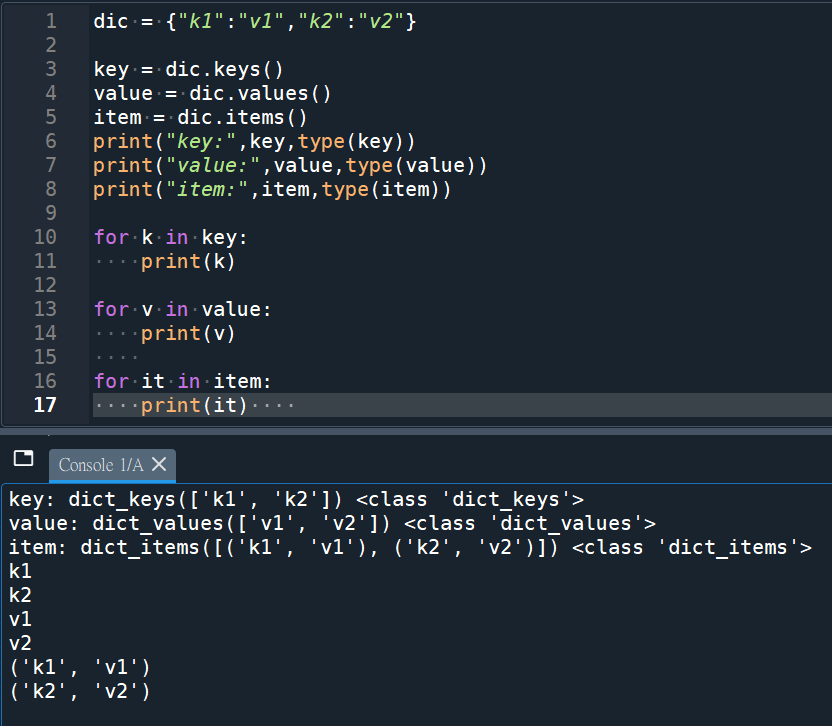
dic = {“k1″:”v1″,”k2″:”v2”}
key = dic.keys()
“””
#像list(有序),但無法使用key[0]
#TypeError: ‘dict_keys’ object is not subscriptable(可下標的)
可使用keyLst = [k for k in key],轉為真正的list
#set(dic)也可取出所有key, type為set (無序)
“””
value = dic.values()
item = dic.items()
print(“key:”,key,type(key))
print(“value:”,value,type(value))
print(“item:”,item,type(item))
for k in key:
print(k)
for v in value:
print(v)
for it in item:
print(it)
type(dicIn.keys):
builtin_function_or_method
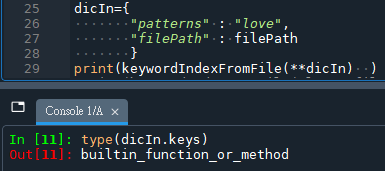
.keys()是一個函式或方法
回傳一個list-like的資料
所以後面需要()
推薦hahow線上學習python: https://igrape.net/30afN

![Python: pandas.DataFrame串接; pandas.concat( [df1,df2] , axis=1, ignore_index=True) ; .append() 產生一個新的DataFrame; 插入欄 .insert() 改變原DataFrame](https://i1.wp.com/savingking.com.tw/wp-content/uploads/2022/11/20221129145451_29.png?quality=90&zoom=2&ssl=1&resize=350%2C233 "Python: pandas.DataFrame串接; pandas.concat( [df1,df2] , axis=1, ignore_index=True) ; .append() 產生一個新的DataFrame; 插入欄 .insert() 改變原DataFrame")



近期留言