


sample.docx 內容(1021 KB):
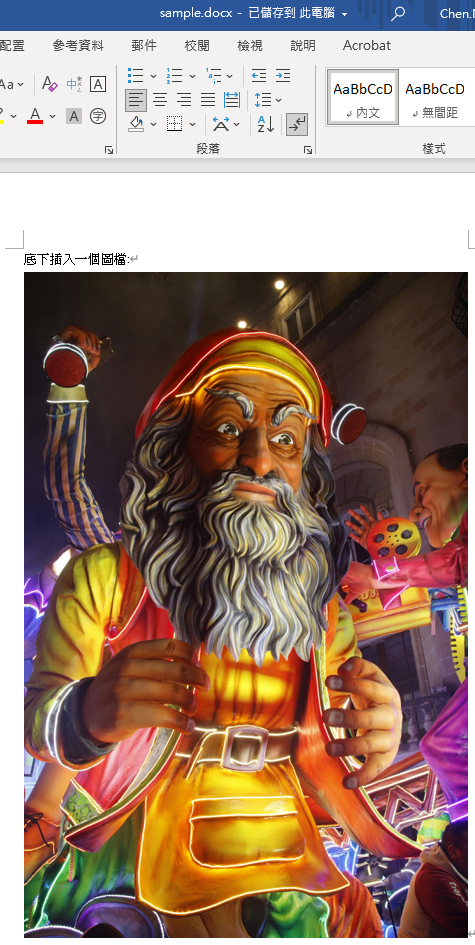
將附檔名改為.zip後
document.xml內容:
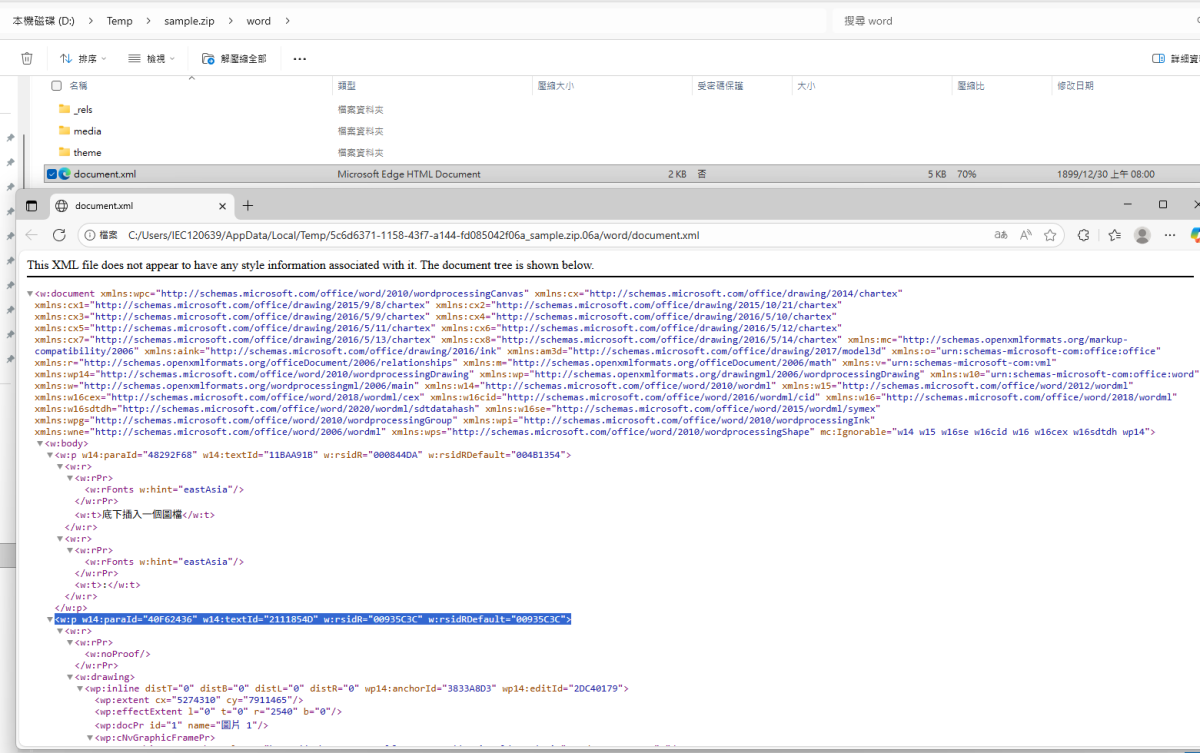
第二段w:p內容(w:p w14:paraId=”40F62436″ …):

概要
- 以路徑 D:\Temp\sample.zip\word\document.xml 為例
- 教你用 lxml.etree 完成:讀取、XPath 查找、修改、刪除與回寫 zip/docx
- 每個段落都附上可直接在 Jupyter 執行的程式碼區塊
準備
- 檔案結構:D:\Temp\sample.zip 內的 word/document.xml
- 若你的來源是 .docx,將 zip_path 改成 .docx 亦可(.docx 本質是 OpenXML 壓縮包)
一、安裝與基本讀取
# 如果未安裝 lxml,先執行這行(在 Jupyter 內可直接跑)
# %pip install lxml

from pathlib import Path
import zipfile
from lxml import etree

# 指定你的路徑
zip_path = Path(r"D:\Temp\sample.zip")
member = "word/document.xml"

# 讀出 XML 字串
with zipfile.ZipFile(zip_path, "r") as zf:
    xml = zf.read(member).decode("utf-8", errors="replace")
    # zf: <class 'zipfile.ZipFile'>
    # zf.read(member): <class 'bytes'>
    # xml: str

# 解析
parser = etree.XMLParser(remove_blank_text=False,
                         recover=True, huge_tree=True)
# lxml.etree.XMLParser
# 在 lxml.etree.XMLParser 中,recover=True 表示
#「解析時若遇到不符合規範的 XML,也嘗試修復並繼續,而不是直接拋錯停止」。

root = etree.fromstring(xml.encode("utf-8"), parser=parser)
#xml.encode("utf-8"): bytes
#root : lxml.etree._Element

# 常用命名空間(OOXML)#Dict[前綴,命名空間]
ns = {
    "w":   "http://schemas.openxmlformats.org/wordprocessingml/2006/main",
    "a":   "http://schemas.openxmlformats.org/drawingml/2006/main",
    "r":   "http://schemas.openxmlformats.org/officeDocument/2006/relationships",
    "wp":  "http://schemas.openxmlformats.org/drawingml/2006/wordprocessingDrawing",
    "pic": "http://schemas.openxmlformats.org/drawingml/2006/picture",
    "w14": "http://schemas.microsoft.com/office/word/2010/wordml",
}

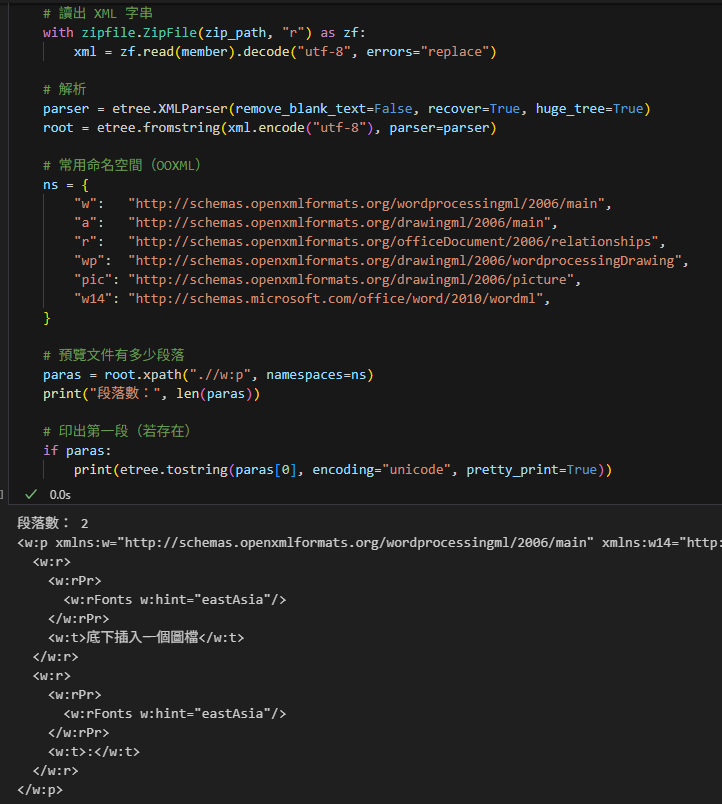
# 預覽文件有多少段落
paras = root.xpath(".//w:p", namespaces=ns)
#List[lxml.etree._Element]
print("段落數:", len(paras))

# 印出第一段(若存在)
if paras:
    print(etree.tostring(paras[0],
                         encoding="unicode",
                         pretty_print=True))
    """
    #encoding = "unicode" 輸出str,   適用:在程式中檢視、log、debug、正則比對。
    #encoding = "utf-8"   輸出bytes, 適用:寫檔、寫進 ZIP、網路傳輸、做散列。
    不要對 Element (paras[0]) 呼叫 decode/encode;
    對 bytes 才 decode,對 str 才 encode
"""輸出:
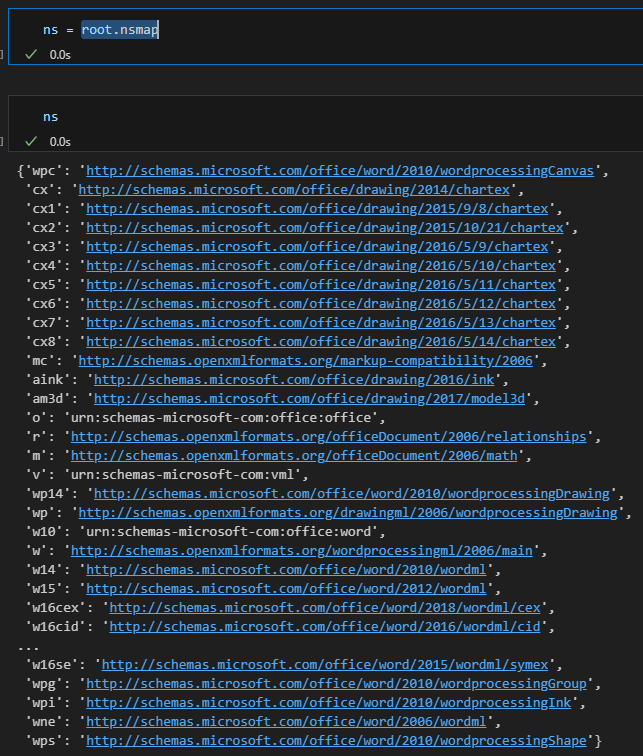
root.nsmap #Dict[前綴,命名空間]:
root.iter()

讀出 XML 字串:
# 讀出 XML 字串
with zipfile.ZipFile(zip_path, "r") as zf:
xml = zf.read(member).decode("utf-8", errors="replace")zf.namelist()
#zf.read() 中放的
member = “word/document.xml” :
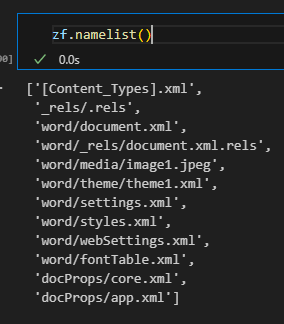
print( BeautifulSoup(xml,features = "xml").prettify() ):
<?xml version="1.0" encoding="utf-8"?>
<w:document mc:Ignorable="w14 w15 w16se w16cid w16 w16cex w16sdtdh wp14" xmlns:aink="http://schemas.microsoft.com/office/drawing/2016/ink" xmlns:am3d="http://schemas.microsoft.com/office/drawing/2017/model3d" xmlns:cx="http://schemas.microsoft.com/office/drawing/2014/chartex" xmlns:cx1="http://schemas.microsoft.com/office/drawing/2015/9/8/chartex" xmlns:cx2="http://schemas.microsoft.com/office/drawing/2015/10/21/chartex" xmlns:cx3="http://schemas.microsoft.com/office/drawing/2016/5/9/chartex" xmlns:cx4="http://schemas.microsoft.com/office/drawing/2016/5/10/chartex" xmlns:cx5="http://schemas.microsoft.com/office/drawing/2016/5/11/chartex" xmlns:cx6="http://schemas.microsoft.com/office/drawing/2016/5/12/chartex" xmlns:cx7="http://schemas.microsoft.com/office/drawing/2016/5/13/chartex" xmlns:cx8="http://schemas.microsoft.com/office/drawing/2016/5/14/chartex" xmlns:m="http://schemas.openxmlformats.org/officeDocument/2006/math" xmlns:mc="http://schemas.openxmlformats.org/markup-compatibility/2006" xmlns:o="urn:schemas-microsoft-com:office:office" xmlns:r="http://schemas.openxmlformats.org/officeDocument/2006/relationships" xmlns:v="urn:schemas-microsoft-com:vml" xmlns:w="http://schemas.openxmlformats.org/wordprocessingml/2006/main" xmlns:w10="urn:schemas-microsoft-com:office:word" xmlns:w14="http://schemas.microsoft.com/office/word/2010/wordml" xmlns:w15="http://schemas.microsoft.com/office/word/2012/wordml" xmlns:w16="http://schemas.microsoft.com/office/word/2018/wordml" xmlns:w16cex="http://schemas.microsoft.com/office/word/2018/wordml/cex" xmlns:w16cid="http://schemas.microsoft.com/office/word/2016/wordml/cid" xmlns:w16sdtdh="http://schemas.microsoft.com/office/word/2020/wordml/sdtdatahash" xmlns:w16se="http://schemas.microsoft.com/office/word/2015/wordml/symex" xmlns:wne="http://schemas.microsoft.com/office/word/2006/wordml" xmlns:wp="http://schemas.openxmlformats.org/drawingml/2006/wordprocessingDrawing" xmlns:wp14="http://schemas.microsoft.com/office/word/2010/wordprocessingDrawing" xmlns:wpc="http://schemas.microsoft.com/office/word/2010/wordprocessingCanvas" xmlns:wpg="http://schemas.microsoft.com/office/word/2010/wordprocessingGroup" xmlns:wpi="http://schemas.microsoft.com/office/word/2010/wordprocessingInk" xmlns:wps="http://schemas.microsoft.com/office/word/2010/wordprocessingShape">
 <w:body>
  <w:p w14:paraId="48292F68" w14:textId="11BAA91B" w:rsidR="000844DA" w:rsidRDefault="004B1354">
   <w:r>
    <w:rPr>
     <w:rFonts w:hint="eastAsia"/>
    </w:rPr>
    <w:t>
     底下插入一個圖檔
    </w:t>
   </w:r>
   <w:r>
    <w:rPr>
     <w:rFonts w:hint="eastAsia"/>
    </w:rPr>
    <w:t>
     :
    </w:t>
   </w:r>
  </w:p>
  <w:p w14:paraId="40F62436" w14:textId="2111854D" w:rsidR="00935C3C" w:rsidRDefault="00935C3C">
   <w:r>
    <w:rPr>
     <w:noProof/>
    </w:rPr>
    <w:drawing>
     <wp:inline distB="0" distL="0" distR="0" distT="0" wp14:anchorId="3833A8D3" wp14:editId="2DC40179">
      <wp:extent cx="5274310" cy="7911465"/>
      <wp:effectExtent b="0" l="0" r="2540" t="0"/>
      <wp:docPr id="1" name="圖片 1"/>
      <wp:cNvGraphicFramePr>
       <a:graphicFrameLocks noChangeAspect="1" xmlns:a="http://schemas.openxmlformats.org/drawingml/2006/main"/>
      </wp:cNvGraphicFramePr>
      <a:graphic xmlns:a="http://schemas.openxmlformats.org/drawingml/2006/main">
       <a:graphicData uri="http://schemas.openxmlformats.org/drawingml/2006/picture">
        <pic:pic xmlns:pic="http://schemas.openxmlformats.org/drawingml/2006/picture">
         <pic:nvPicPr>
          <pic:cNvPr id="1" name="圖片 1"/>
          <pic:cNvPicPr/>
         </pic:nvPicPr>
         <pic:blipFill>
          <a:blip cstate="print" r:embed="rId4">
           <a:extLst>
            <a:ext uri="{28A0092B-C50C-407E-A947-70E740481C1C}">
             <a14:useLocalDpi val="0" xmlns:a14="http://schemas.microsoft.com/office/drawing/2010/main"/>
            </a:ext>
           </a:extLst>
          </a:blip>
          <a:stretch>
           <a:fillRect/>
          </a:stretch>
         </pic:blipFill>
         <pic:spPr>
          <a:xfrm>
           <a:off x="0" y="0"/>
           <a:ext cx="5274310" cy="7911465"/>
          </a:xfrm>
          <a:prstGeom prst="rect">
           <a:avLst/>
          </a:prstGeom>
         </pic:spPr>
        </pic:pic>
       </a:graphicData>
      </a:graphic>
     </wp:inline>
    </w:drawing>
   </w:r>
  </w:p>
  <w:sectPr w:rsidR="00935C3C">
   <w:pgSz w:h="16838" w:w="11906"/>
   <w:pgMar w:bottom="1440" w:footer="992" w:gutter="0" w:header="851" w:left="1800" w:right="1800" w:top="1440"/>
   <w:cols w:space="425"/>
   <w:docGrid w:linePitch="360" w:type="lines"/>
  </w:sectPr>
 </w:body>
</w:document>print(etree.tostring(root, encoding="unicode", pretty_print=True))
#print( BeautifulSoup(xml,features = "xml").prettify() ) 效果類似
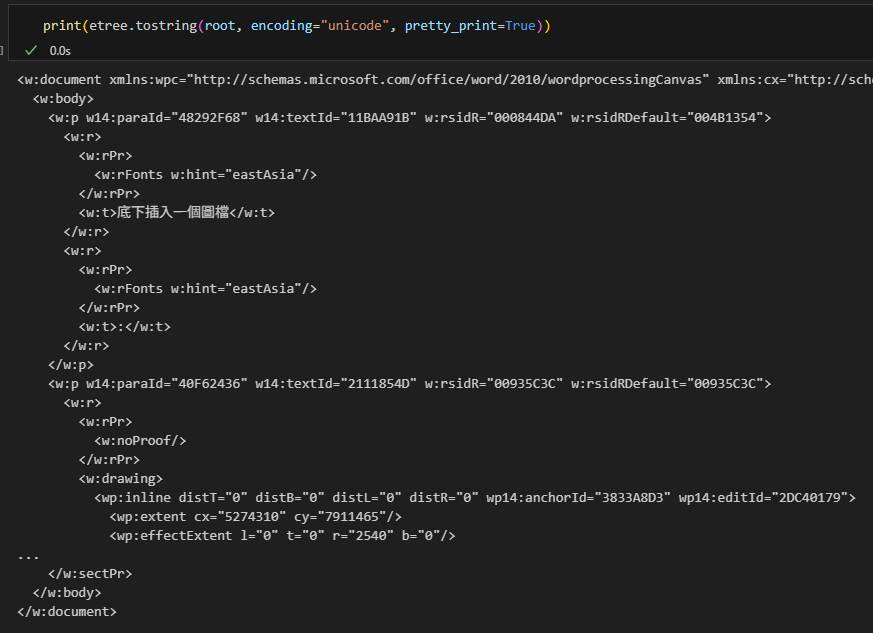
parser :
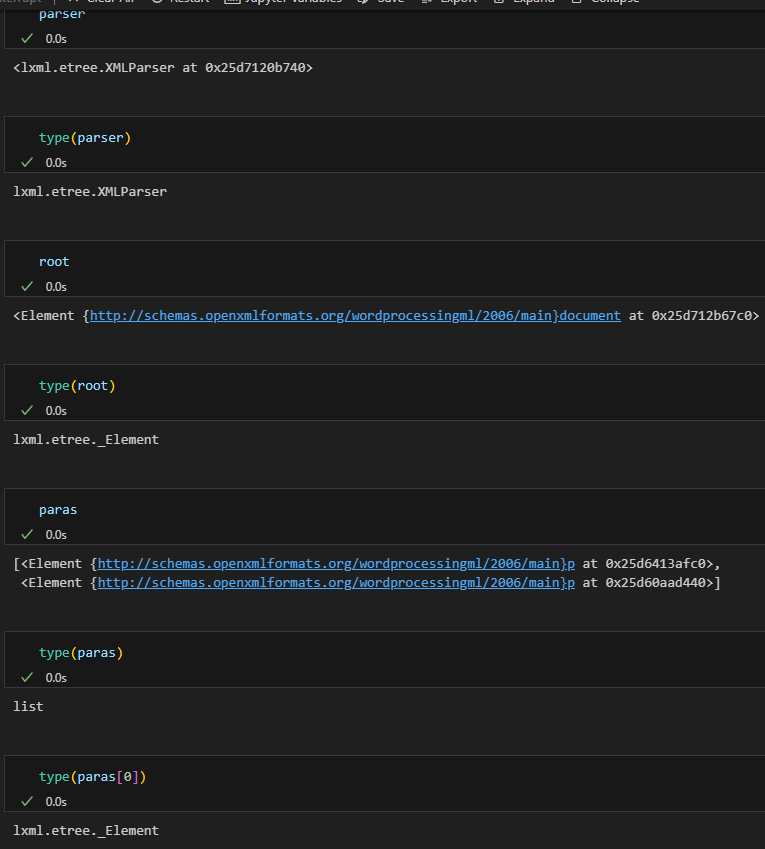
二、用 XPath 精準查找:找出含特定圖片 rId 的段落
# 想查找的關聯 ID(例如 rId4)
rid = "rId4"

# 1) 查找外層段落 w:p,條件:內部有 a:blip 的 r:embed 或 r:link 命中
xp = ".//w:p[.//a:blip[@r:embed=$rid or @r:link=$rid]]"
# 命中含有目標 <a:blip r:embed="rId4">(或 r:link="rId4")的「段落」w:p
"""
在 XPath 裡,方括號 […] 是「謂詞(predicate)」——用來過濾節點集合的條件。

表達式
.//w:p[.//a:blip[@r:embed=$rid or @r:link=$rid]]
可分解為:

.//w:p:從當前節點往下選出所有 w:p 段落節點。
[ … ]:對前面選出的每個 w:p 套用條件,保留「條件為真」的那些 w:p。
具體這個謂詞的條件是:
.//a:blip[@r:embed=$rid or @r:link=$rid]
意思是:在該 w:p 節點的後代中,是否存在 a:blip 且其 r:embed 或 r:link 屬性等於 $rid。存在即為真,該 w:p 被保留;不存在則被過濾掉。

補充:

predicate 裡也可用索引或其他比較,例如 w:p[1](第一個段落)、w:p[@w:rsidR](有某屬性的段落)、w:p[count(.//a:blip)>0](至少有一個 blip)。
多個謂詞可以連寫,依序過濾:w:p[condition1][condition2]。
"""
hits = root.xpath(xp, namespaces=ns, rid=rid)
# List[lxml.etree._Element]
print("命中段落數:", len(hits))

# 2) 顯示第一個命中的 paraId 與完整 XML
if hits:
    p = hits[0]
    # <Element {http://schemas.openxmlformats.org/wordprocessingml/2006/main}p at 0x25d6299c3c0>
    paraId = p.get(f"{{{ns['w14']}}}paraId") #'40F62436'
    #f-string 中 , {{ 轉義 為{
    # }} 轉義為}
    # f"{{{ns['w14']}}}paraId" :
    # '{http://schemas.microsoft.com/office/word/2010/wordml}paraId'
    print("命中 paraId:", paraId)
    print(etree.tostring(p, encoding="unicode", pretty_print=True))

# 3) 也可以直接列出文檔內所有圖片 rId
rids = root.xpath("//a:blip/@r:embed | //a:blip/@r:link", namespaces=ns)
print("文檔中出現的 rId 一覽:", sorted(set(rids)))輸出:
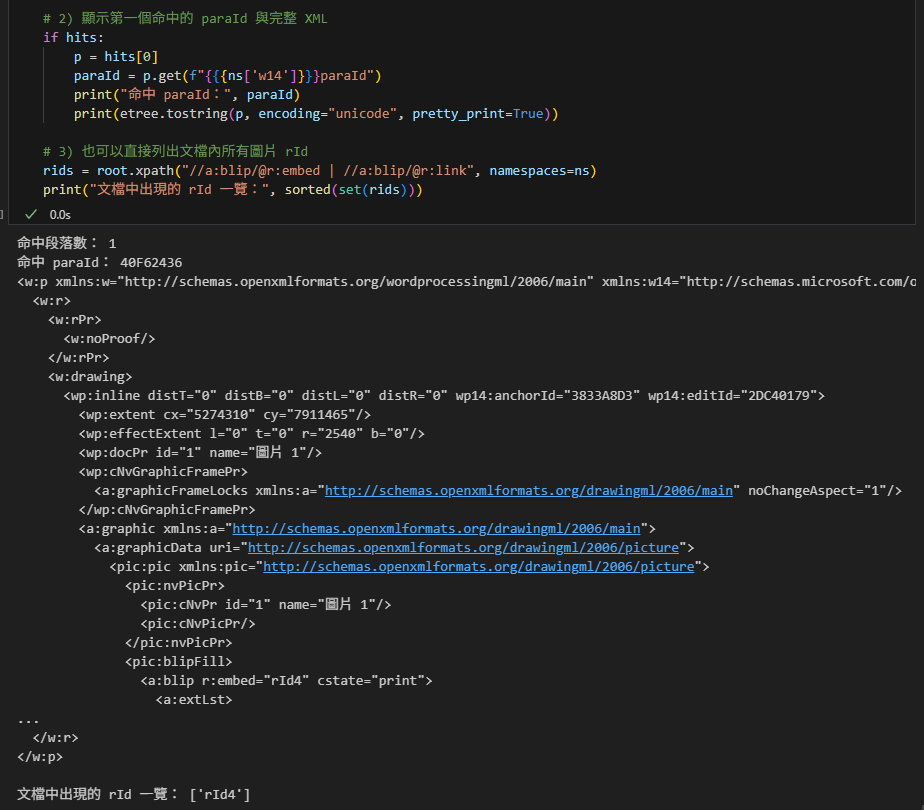
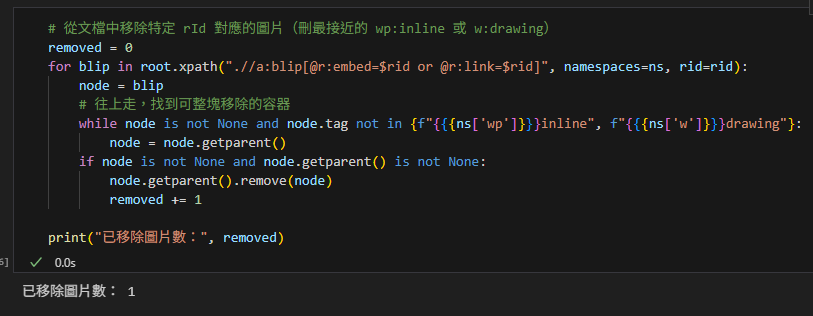
三、只刪除圖片,保留段落與文字
# 從文檔中移除特定 rId 對應的圖片(刪最接近的 wp:inline 或 w:drawing)
removed = 0
for blip in root.xpath(".//a:blip[@r:embed=$rid or @r:link=$rid]",
                       namespaces=ns, rid=rid):
    node = blip
    # 往上走,找到可整塊移除的容器
    while node is not None and node.tag not in {f"{{{ns['wp']}}}inline",
                                                f"{{{ns['w']}}}drawing"}:
        """
        # ns['wp']
        #'http://schemas.openxmlformats.org/drawingml/2006/wordprocessingDrawing'
        # ns['w']
        #'http://schemas.openxmlformats.org/wordprocessingml/2006/main'
        內嵌圖:wp:inline
        段落中的繪圖容器:w:drawing
        """
        node = node.getparent()
    if node is not None and node.getparent() is not None:
        node.getparent().remove(node)
        removed += 1

print("已移除圖片數:", removed)輸出:
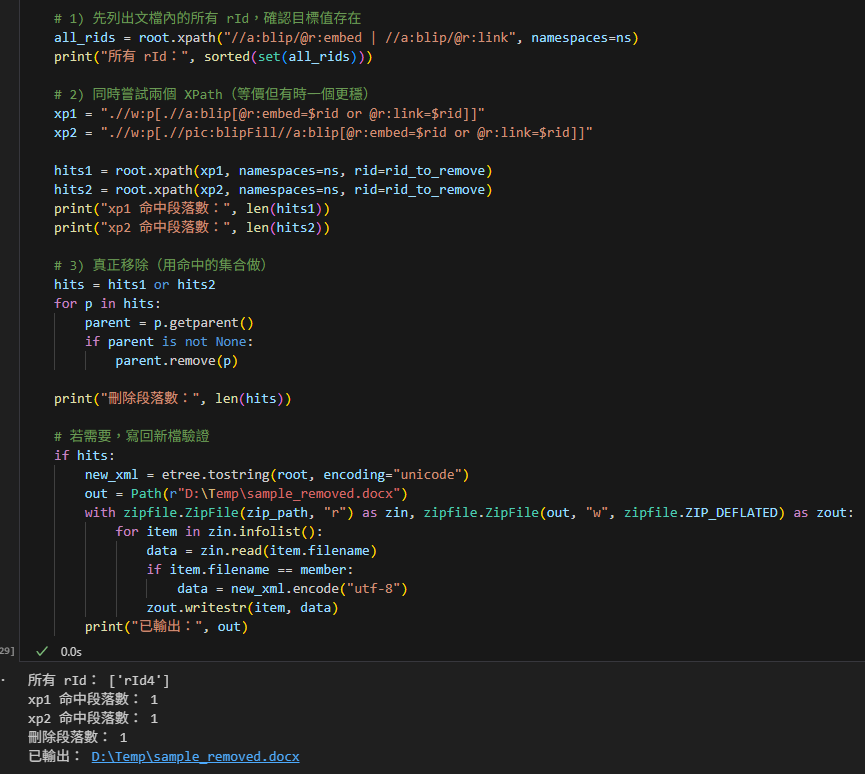
四、刪除整個命中段落
# %pip install lxml
from pathlib import Path
import zipfile
from lxml import etree

zip_path = Path(r"D:\Temp\sample.zip")      # 改成你的檔
member = "word/document.xml"
rid_to_remove = "rId4"                       # 想刪的 rId

# 讀與解析
with zipfile.ZipFile(zip_path, "r") as zf:
    xml = zf.read(member).decode("utf-8", errors="replace")
parser = etree.XMLParser(recover=True, huge_tree=True)
root = etree.fromstring(xml.encode("utf-8"), parser=parser)

ns = {
    "w":   "http://schemas.openxmlformats.org/wordprocessingml/2006/main",
    "a":   "http://schemas.openxmlformats.org/drawingml/2006/main",
    "r":   "http://schemas.openxmlformats.org/officeDocument/2006/relationships",
    "wp":  "http://schemas.openxmlformats.org/drawingml/2006/wordprocessingDrawing",
    "pic": "http://schemas.openxmlformats.org/drawingml/2006/picture",
    "w14": "http://schemas.microsoft.com/office/word/2010/wordml",
}

# 1) 先列出文檔內的所有 rId,確認目標值存在
all_rids = root.xpath("//a:blip/@r:embed | //a:blip/@r:link", namespaces=ns)
print("所有 rId:", sorted(set(all_rids)))

# 2) 同時嘗試兩個 XPath(等價但有時一個更穩)
xp1 = ".//w:p[.//a:blip[@r:embed=$rid or @r:link=$rid]]"
xp2 = ".//w:p[.//pic:blipFill//a:blip[@r:embed=$rid or @r:link=$rid]]"

hits1 = root.xpath(xp1, namespaces=ns, rid=rid_to_remove)
hits2 = root.xpath(xp2, namespaces=ns, rid=rid_to_remove)
print("xp1 命中段落數:", len(hits1))
print("xp2 命中段落數:", len(hits2))

# 3) 真正移除(用命中的集合做)
hits = hits1 or hits2
for p in hits:
    parent = p.getparent()
    if parent is not None:
        parent.remove(p)

print("刪除段落數:", len(hits))

# 若需要,寫回新檔驗證
if hits:
    new_xml = etree.tostring(root, encoding="unicode")
    out = Path(r"D:\Temp\sample_removed.docx")
    with zipfile.ZipFile(zip_path, "r") as zin,
         zipfile.ZipFile(out, "w", zipfile.ZIP_DEFLATED) as zout:
        for item in zin.infolist():
        #item : zipfile.ZipInfo
            data = zin.read(item.filename)
            if item.filename == member:
                data = new_xml.encode("utf-8")
            zout.writestr(item, data)
print("已輸出:", out)常用語法速記
- child: a/b/c 直系子節點
- descendant: .//a 任意深度後代
- parent: ../ 回到父節點
- ancestor::w:p 往上找祖先 w:p
- predicate: w:p[w:r] 段落中含 w:r
- attribute: //@attr 任何節點上的 attr
- or/and: [@r:embed=$rid or @r:link=$rid]
在 XPath 裡:
- @ 是「屬性」選擇器
- @r:embed 指的是節點上的名為 r:embed 的屬性
- @r:link 指的是節點上的名為 r:link 的屬性
- 例如在 <a:blip r:embed=”rId4″/>,@r:embed 的值就是 “rId4”
- $ 是「變數」引用(由你的 XPath 執行端提供)
- $rid 代表一個外部傳入的變數 rid
- 在 lxml 中會這樣呼叫:
root.xpath(“//a:blip[@r:embed=$rid or @r:link=$rid]”, namespaces=ns, rid=”rId4″)
這表示把字串 “rId4” 綁定到 XPath 裡的變數 $rid
所以整句的意思是:選出所有 a:blip 節點,且該節點的屬性 r:embed 或 r:link 的值等於變數 $rid。
輸出:
五、寫回成新的 zip 或 docx
def write_back(orig_zip: Path, out_zip: Path, new_xml_str: str):
    """把修改過的 document.xml 寫回新的壓縮包(zip/docx 皆可)。"""
    with zipfile.ZipFile(orig_zip, "r") as zin,
         zipfile.ZipFile(out_zip, "w", zipfile.ZIP_DEFLATED) as zout:
        for item in zin.infolist():
            data = zin.read(item.filename)
            if item.filename == "word/document.xml":
                data = new_xml_str.encode("utf-8")
            zout.writestr(item, data)

# 產生新檔(副檔名可用 .docx)
out_path = Path(r"D:\Temp\sample_modified.docx")
new_xml = etree.tostring(root, encoding="unicode")
write_back(zip_path, out_path, new_xml)
print("已寫出:", out_path)sample_modified.docx (1019KB,
相較於原本的1021KB,
雖然大圖消失了,但檔案容量幾乎沒縮小,
請參考: Python DOCX 圖片瘦身實戰)

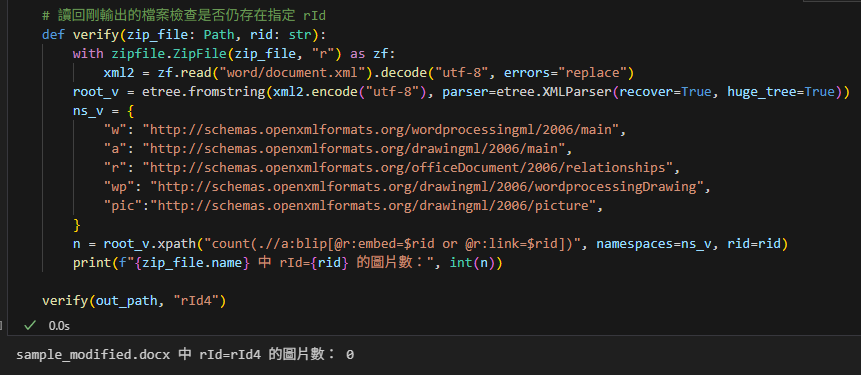
六、快速驗證輸出
# 讀回剛輸出的檔案檢查是否仍存在指定 rId
def verify(zip_file: Path, rid: str):
    with zipfile.ZipFile(zip_file, "r") as zf:
        xml2 = zf.read("word/document.xml").decode("utf-8", errors="replace")
    root_v = etree.fromstring(xml2.encode("utf-8"),
                              parser=etree.XMLParser(recover=True,
                                                     huge_tree=True))
    ns_v = {
        "w": "http://schemas.openxmlformats.org/wordprocessingml/2006/main",
        "a": "http://schemas.openxmlformats.org/drawingml/2006/main",
        "r": "http://schemas.openxmlformats.org/officeDocument/2006/relationships",
        "wp": "http://schemas.openxmlformats.org/drawingml/2006/wordprocessingDrawing",
        "pic":"http://schemas.openxmlformats.org/drawingml/2006/picture",
    }
    n = root_v.xpath("count(.//a:blip[@r:embed=$rid or @r:link=$rid])",
                     namespaces=ns_v, rid=rid)
    print(f"{zip_file.name} 中 rId={rid} 的圖片數:", int(n))

verify(out_path, "rId4")輸出:
七、常見錯誤與速解
- 找不到節點:多半是命名空間 URI 沒對。前綴名稱可自訂,但 URI 必須精準一致。
- 解析錯誤:對不乾淨的 XML 使用 recover=True;對大型檔案加 huge_tree=True。
- Edge/文字編輯器看不到重點:瀏覽器只顯示,不會做 XPath;請用 lxml 驗證。
八、延伸操作範例
- 取得所有段落的 w14:paraId
para_ids = [p.get(f"{{{ns['w14']}}}paraId") for p in root.xpath(".//w:p", namespaces=ns)]
print([pid for pid in para_ids if pid])
# ns['w14']
# 'http://schemas.microsoft.com/office/word/2010/wordml'輸出:

結語
- 以 lxml.etree 操作 OOXML,核心在「正確宣告命名空間」與「用 XPath 自內而外定位」。
- 以上每段程式都能直接在 Jupyter 貼上執行,從讀取、查找,到修改與寫回完整打通。
推薦hahow線上學習python: https://igrape.net/30afN
# 常用命名空間(OOXML)
ns = {
    "w":   "http://schemas.openxmlformats.org/wordprocessingml/2006/main",
    "a":   "http://schemas.openxmlformats.org/drawingml/2006/main",
    "r":   "http://schemas.openxmlformats.org/officeDocument/2006/relationships",
    "wp":  "http://schemas.openxmlformats.org/drawingml/2006/wordprocessingDrawing",
    "pic": "http://schemas.openxmlformats.org/drawingml/2006/picture",
    "w14": "http://schemas.microsoft.com/office/word/2010/wordml",
}這是一個給 XML 解析器(例如 lxml、ElementTree)用的「命名空間映射表」。用途是在寫 XPath 或查找節點時,把簡短前綴(prefix)對應到 OOXML 規格中的完整命名空間 URI,讓查詢能精確匹配正確的元素與屬性。
逐項說明
- 鍵(如 “w”, “a”, “r”…)是你在 XPath 中會用到的前綴。
- 值是對應的 XML Namespace URI。
XML 比對是看「命名空間 + 本地名稱」,不是看前綴字樣本身。
各前綴含義(WordprocessingML/OOXML 常見)
- w → WordprocessingML 主命名空間(段落 w:p、文字 w:t、段落屬性等)
URI: http://schemas.openxmlformats.org/wordprocessingml/2006/main - a → DrawingML 主命名空間(圖形基本元素、形狀、填充等)
URI: http://schemas.openxmlformats.org/drawingml/2006/main - r → OfficeDocument relationships(關聯,如 r:embed、r:id、r:link)
URI: http://schemas.openxmlformats.org/officeDocument/2006/relationships - wp → DrawingML for Wordprocessing(Word 內嵌圖形框、定位等,如 wp:inline、wp:anchor)
URI: http://schemas.openxmlformats.org/drawingml/2006/wordprocessingDrawing - pic → DrawingML picture(圖片層級,如 pic:pic、pic:blipFill)
URI: http://schemas.openxmlformats.org/drawingml/2006/picture - w14 → Word 2010 擴充(Word 2010 新增的 wordml 元素/屬性)
URI: http://schemas.microsoft.com/office/word/2010/wordml
為什麼需要這個映射
- 在 XPath 中你必須使用前綴,並提供解析器一個字典告訴它「這個前綴代表哪個 namespace」:
例子:- 找所有段落:root.xpath(“//w:p”, namespaces=ns)
- 找到圖片的 blip:root.xpath(“//a:blip[@r:embed]”, namespaces=ns)
- 找 Word 2010 的段落 ID:root.xpath(“//w:p/@w14:paraId”, namespaces=ns)
常見陷阱
- 忘了傳 namespaces=ns,XPath 會找不到任何帶命名空間的節點。
- 不能只寫 //p 或 //blip,必須帶對應前綴(如 //w:p、//a:blip)。
- 前綴名稱可自訂,但 URI 必須正確;XPath 中使用的前綴要和這個字典的鍵一致。
推薦hahow線上學習python: https://igrape.net/30afN
下面是一份簡明的「XML 樹節點」入門教學,基於 Python 的 lxml.etree。你可以拿 OOXML(Word 的 document.xml)或任意 XML 檔來練習。
一、基本概念
- XML 是樹狀結構:每個元素(Element)都是一個節點。
- 節點包含:
- tag(標籤名,可能帶命名空間)
- attrib(屬性字典)
- text(開始標籤內的文字)
- tail(結束標籤後、下一個兄弟節點前的文字)
- children(子元素)
二、最小示例
from lxml import etree

xml = """<root>
  <item id="A">hello<em>bold</em>world</item>
  <item id="B"/>
</root>"""

root = etree.fromstring(xml)  # root 是一個 Element 節點
#lxml.etree._Element三、查看節點基本屬性
print(root.tag)        # 'root'
print(root.attrib)     # {}  (root 沒屬性)
print(list(root)) # [<Element item at 0x...>, <Element item at 0x...>]輸出:

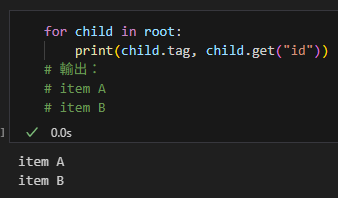
四、遍歷子節點
for child in root:
    print(child.tag, child.get("id"))
# 輸出:
# item A
# item B輸出:
五、文字與 tail
itemA = root[0]
print(itemA.text)          # 'hello'(在 <item> 與第一個子元素 <em> 之間)
print(itemA[0].tag)        # 'em'
print(itemA[0].text)       # 'bold'(<em> 的內文)
print(itemA[0].tail) # 'world'(</em> 後到 </item> 前的文字)輸出:
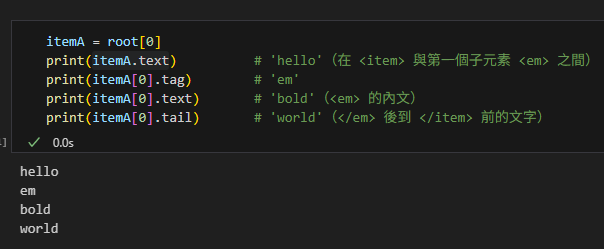
提示:很多人只看 text 忘了 tail,導致重建文字時漏字。
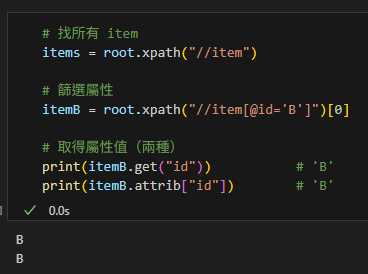
六、查找節點(XPath)
# 找所有 item
items = root.xpath("//item")

# 篩選屬性
itemB = root.xpath("//item[@id='B']")[0]

# 取得屬性值(兩種)
print(itemB.get("id"))           # 'B'
print(itemB.attrib["id"]) # 'B'輸出:
七、增刪改節點
# 新增節點
new_item = etree.Element("item", id="C")
new_item.text = "new"
root.append(new_item)

# 插入到指定位置
root.insert(1, etree.Element("sep"))

# 刪除節點
root.remove(root[1])  # 刪掉 <sep>

# 修改屬性與文字
new_item.set("id", "C1")
new_item.text = "updated"八、命名空間(OOXML 會遇到)
- 內部使用「{命名空間URI}本地名」(Clark notation)。
- 例如 OOXML 的 w:p 內部是 “{http://schemas.openxmlformats.org/wordprocessingml/2006/main}p“
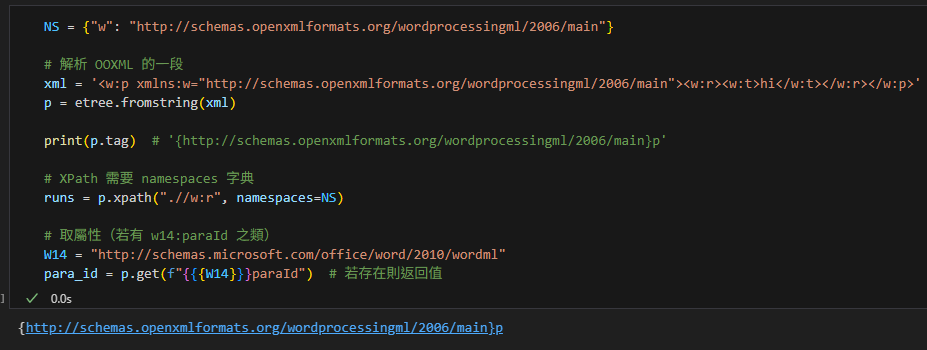
示例(以 OOXML 的段落 w:p 為例):
NS = {"w": "http://schemas.openxmlformats.org/wordprocessingml/2006/main"}

# 解析 OOXML 的一段
xml = '<w:p xmlns:w="http://schemas.openxmlformats.org/wordprocessingml/2006/main"><w:r><w:t>hi</w:t></w:r></w:p>'
p = etree.fromstring(xml)

print(p.tag)  # '{http://schemas.openxmlformats.org/wordprocessingml/2006/main}p'

# XPath 需要 namespaces 字典
runs = p.xpath(".//w:r", namespaces=NS)

# 取屬性(若有 w14:paraId 之類)
W14 = "http://schemas.microsoft.com/office/word/2010/wordml"
para_id = p.get(f"{{{W14}}}paraId") # 若存在則返回值- 命名空間(XML Namespace)
- 用途:避免「同名標籤」撞名。
- 表示法:用一個 URI 當作「姓氏」,把同家族的標籤歸在一起。
- 在範例中,xmlns:w=”http://schemas.openxmlformats.org/wordprocessingml/2006/main“
表示:凡是帶有前綴 w: 的元素,都屬於這個命名空間 URI。 - 直覺比喻:很多人都叫「p」,但「w 家的 p」和「a 家的 p」不一樣;用命名空間就知道是哪一家。
「p」是本地名(local name),也就是元素的「名字本體」,不含命名空間的姓氏部分。
對比關係:
- w:p → 前綴 w(指向某個命名空間 URI)+ 本地名 p
- a:p → 前綴 a(指向另一個命名空間 URI)+ 本地名 p
所以兩者的「p」字面一樣,但所屬命名空間不同,語義也不同:
- 在 OOXML/WordprocessingML 裡,w:p 表示「段落」(paragraph)。
- 在 DrawingML 裡,a:p 表示「文字段落(圖形/文字方塊中的段落)」。
解析器內部實際識別的是展開名:
- w:p → {http://schemas.openxmlformats.org/wordprocessingml/2006/main}p
- a:p → {http://schemas.openxmlformats.org/drawingml/2006/main}p
結論:「p」是標籤的本地名;真正區分哪一種 p,要看它前面的命名空間(w 或 a 對應的 URI)。
- 前綴(prefix)
- 是命名空間的「暱稱/縮寫」,寫起來方便。
- 範例中的前綴是 w。
- 例如 w:p、w:r、w:t 都是把前綴 w 加在冒號前面,表示「屬於 w 這個命名空間」。
- 注意:前綴只是本檔案中的代號,真正的身份是後面的 URI。換個檔案也可以把同一個 URI 取名成 x、doc 等別的前綴。
- 標籤(tag)
- 就是元素的名字。沒有命名空間時,像 p、r、t 就是標籤。
- 有命名空間時,外部寫成 前綴:本地名,例如 w:p 的本地名是 p。
- 解析器內部真正記的名字不是 w:p,而是 Clark notation:
{命名空間URI}本地名
例如:{http://schemas.openxmlformats.org/wordprocessingml/2006/main}p - 在 lxml/ElementTree 取元素或屬性時,常要用這個展開後的名字。
- 本地名(local name)
- 去掉前綴後的純標籤名。
- w:p 的本地名是 p;w:t 的本地名是 t。
- 為什麼 OOXML 一定要用命名空間
- Word/PowerPoint/Excel 的 XML 都大量使用多個命名空間(w, r, a, wp, pic, …)。
- 同一份文件會同時出現很多叫 p 的元素,但分屬不同命名空間(如 w:p 是段落,a:p 是繪圖段落),必須用命名空間來區分。
- 在 lxml 中如何處理
- 建命名空間字典,讓 XPath 能看懂前綴:
ns = {“w”: “http://schemas.openxmlformats.org/wordprocessingml/2006/main”} - XPath 查找:
p_list = root.xpath(“//w:p”, namespaces=ns) - 直接看標籤(展開名):
root.tag 可能是 “{http://schemas.openxmlformats.org/wordprocessingml/2006/main}p“ - 以展開名新建元素:
from lxml import etree
W = “http://schemas.openxmlformats.org/wordprocessingml/2006/main“
p = etree.Element(f”{{{W}}}p”) # 等同 w:p
- 小結一句話
- 命名空間:給元素「加姓氏」(URI)避免撞名。
- 前綴:這個姓氏在文件裡的縮寫(如 w)。
- tag:元素的名字;帶命名空間時外部寫成 w:p,內部真正名字是 {URI}p。
輸出:
九、父子與兄弟關係
child = root[0]
parent = child.getparent()      # 取父節點
prev = child.getprevious()      # 前一個兄弟
next_ = child.getnext() # 下一個兄弟十、序列化輸出
etree.tostring(root)  # b'<root>...</root>'
print(etree.tostring(root, pretty_print=True, encoding="unicode"))輸出:
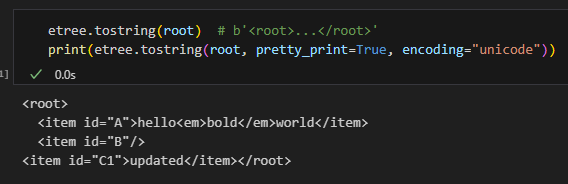
十一、常見坑
- 忘了 namespaces:XPath 找 OOXML 元素時必須傳 namespaces=NS。
- text 與 tail 搞混:連接內容時要考慮兩者。
- 修改後的縮排與空白:pretty_print 只影響輸出格式,不改變語義。
- recover=True 會容錯但可能丟內容;處理嚴格 XML 時謹慎使用。
推薦hahow線上學習python: https://igrape.net/30afN

![Python Logging 完全指南:從基礎到實戰應用; import logging ; logging.basicConfig(level=logging.INFO, handlers=[ logging.StreamHandler(), logging.FileHandler(‘app.log’, mode=’a’, encoding=’utf-8′)] ) ; inspect.currentframe().f_code.co_name #動態取得funcName](https://i2.wp.com/savingking.com.tw/wp-content/uploads/2025/10/20251021155823_0_c16012.png?quality=90&zoom=2&ssl=1&resize=350%2C233 "Python Logging 完全指南:從基礎到實戰應用; import logging ; logging.basicConfig(level=logging.INFO, handlers=[ logging.StreamHandler(), logging.FileHandler(‘app.log’, mode=’a’, encoding=’utf-8′)] ) ; inspect.currentframe().f_code.co_name #動態取得funcName")


![Python: pandas.Series如何只保留str,去除重複值?#isinstance(x:Any, str) -> bool #.drop_duplicates() #Series.apply( function )逐元素應用function運算 #DataFrame.apply( function )逐Series應用function運算 .drop_duplicates() 跟.unique()有何差別? df.drop_duplicates() 等效於 df[~df.duplicated()] - 儲蓄保險王](https://savingking.com.tw/wp-content/uploads/2024/11/20241123194900_0_5218de-520x245.png)

近期留言