


import numpy as np
# 一维数组
a = np.array([1, 2, 3, 4, 5])
print(a[..., 1]) # 等同于 a[1],输出:2
# 二维数组
b = np.array([[1, 2], [3, 4], [5, 6]])
print(b[..., 1]) # 等同于 b[:, 1],输出:[2 4 6]
print(b[1, ...]) # 等同于 b[1, :],输出:[3 4]
# 三维数组
c = np.array([[[1, 2], [3, 4]], [[5, 6], [7, 8]]])
print(c[..., 1]) # 等同于 c[:, :, 1],输出:[[2 4][6 8]]
print(c[1, ..., 1]) # 等同于 c[1, :, 1],输出:[6 8]
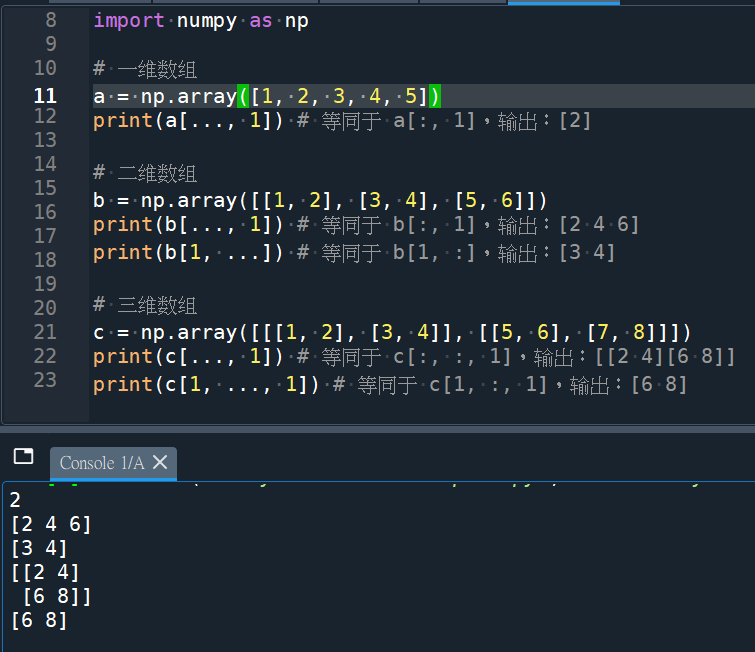
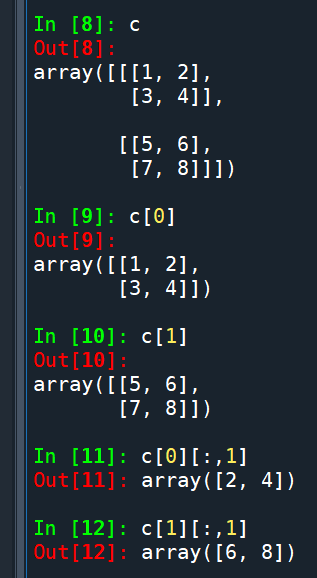
print(c[…, 1]) # 等同于 c[:, :, 1],输出:[[2 4][6 8]]:
推薦hahow線上學習python: https://igrape.net/30afN
![Python:如何將folder_path & file_name合併為file_path? fpath = os.path.join (folder , fname) #不需要[ ]包覆folder,fname; fpath1 = “\\”.join( [folder , fname] ) #需要[ ] 包覆folder,fname ; 反過來講,file_path如何拆分為folder_path & file_name? os.path.dirname() ; os.path.basename() ; file_name如何拆分為主檔名與副檔名os.path.splitext() #split(分裂) ext](https://i1.wp.com/savingking.com.tw/wp-content/uploads/2023/07/20230717184401_87.png?quality=90&zoom=2&ssl=1&resize=350%2C233 "Python:如何將folder_path & file_name合併為file_path? fpath = os.path.join (folder , fname) #不需要[ ]包覆folder,fname; fpath1 = “\\”.join( [folder , fname] ) #需要[ ] 包覆folder,fname ; 反過來講,file_path如何拆分為folder_path & file_name? os.path.dirname() ; os.path.basename() ; file_name如何拆分為主檔名與副檔名os.path.splitext() #split(分裂) ext")





近期留言